
Trig Graphs and the Unit Circle: Dynamic Visualization
Loading the math board and drawing, please wait…
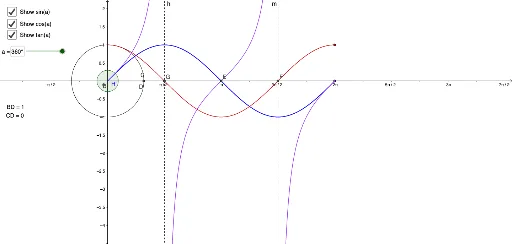
①This GeoGebra example dynamically illustrates the correspondence between trigonometric function graphs (sine, cosine, etc.) and coordinates of points on the unit circle, showing how function values are generated as angles change. ②Core mathematical concepts include the unit circle definition of trigonometric functions, periodicity, function graph transformations (rotation, dilation), and piecewise functions for angle intervals. ③Construction highlights: uses commands such as Intersect, Segment, Rotate, Angle, OrthogonalLine, Distance, and Textfield; objects include circle c, points A/B/C, function f, angle β, segments CD/BD, and input boxes, building a complete mapping from the unit circle to function graphs. ④Suitable for high school and early college students learning trigonometry and function graphing, as well as for classroom demonstrations to deepen understanding of the geometric essence and transformation rules of trigonometric functions.
GeoGebra Commands & Parameters
Intersect(c, xAxis, 2) → AIntersect(xAxis, yAxis) → BSegment(A, B) → fRotate(A, a, B) → CAngle(A, B, C) → βSegment(C, B) → gOrthogonalLine(C, xAxis) → iIntersect(i, xAxis) → DSegment(C, D) → jSegment(D, B) → kDistance(C, D) → distanceCDDistance(B, D) → distanceBDTextfield(a) → InputBox1Intersect(H', K', (3.141592653589793, 0)) → EIntersect(J', xAxis, (4.71238898038469, 0)) → FOrthogonalLine(F, xAxis) → mIntersect(J', xAxis, (1.5707963267948966, 0)) → GOrthogonalLine(G, xAxis) → h
AI Drawing Prompt Reference
Draw a unit circle with points on it to show the correspondence between the coordinates of these points and the graphs of sine and cosine functions. Use a slider to dynamically control the angle, illustrating how the function values are generated as the angle changes. Include line segments connecting the points on the circle to the coordinate axes, and perpendicular lines from the points to the axes, forming the graphs of sine and cosine functions.
The prompt above was compiled from the original drawing commands and is for reference only.