
Triangle Reflection Exploration
Loading the math board and drawing, please wait…
In collections
Transformations
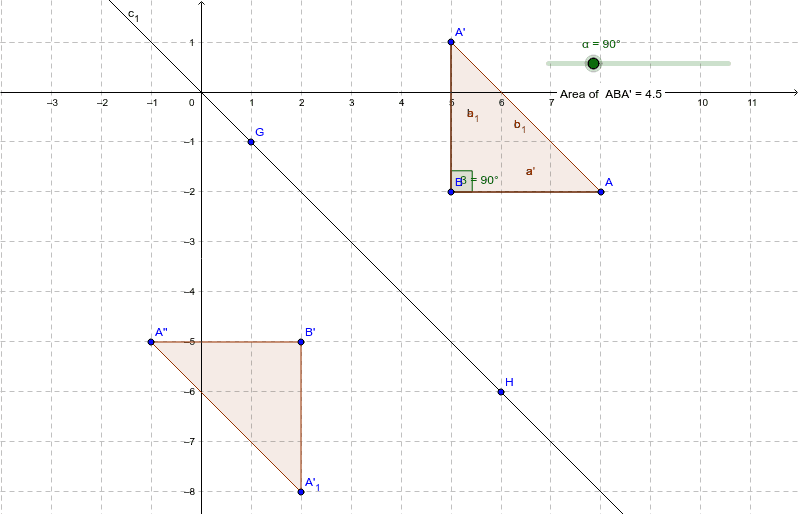
This example demonstrates how students can manipulate a triangular pre-image and observe the changes in its reflected image. Core math concepts include reflection transformation, angles, segments, and polygons. Constructed using commands like Rotate, Angle, Segment, Polygon, PointIn, Line, and Mirror. Suitable for middle school and above students to learn geometric transformations.
GeoGebra Commands & Parameters
Rotate(A, α, B) → A'Angle(A, B, A') → βSegment(A, B) → aSegment(B, A') → bSegment(A', A) → cPolygon(A, B, A') → poly1, a', a_1, b_1PointIn(poly1) → Pointpoly1Line(G, H) → c_1Mirror(A, c_1) → A'_1Mirror(B, c_1) → B'Mirror(A', c_1) → A''Polygon(A'_1, B', A'') → poly1', a'', a'_1, b'
AI Drawing Prompt Reference
Draw a triangle and rotate one vertex around another to create a new vertex. Connect the vertices to form a new triangle. Measure the angles before and after rotation, and draw the corresponding segments. Then, reflect the rotated triangle over a line segment to obtain another triangle. Finally, mark a point on each triangle and display the entire transformation process.
The prompt above was compiled from the original drawing commands and is for reference only.