
Triangle Interior & Exterior Angle Sum Theorems (II)
Loading the math board and drawing, please wait…
In collections
Polygons & Angles
Polygons & Angles
Polygons & Angles
Geometry: Polygons & Angles
Geometry: Polygons & Angles
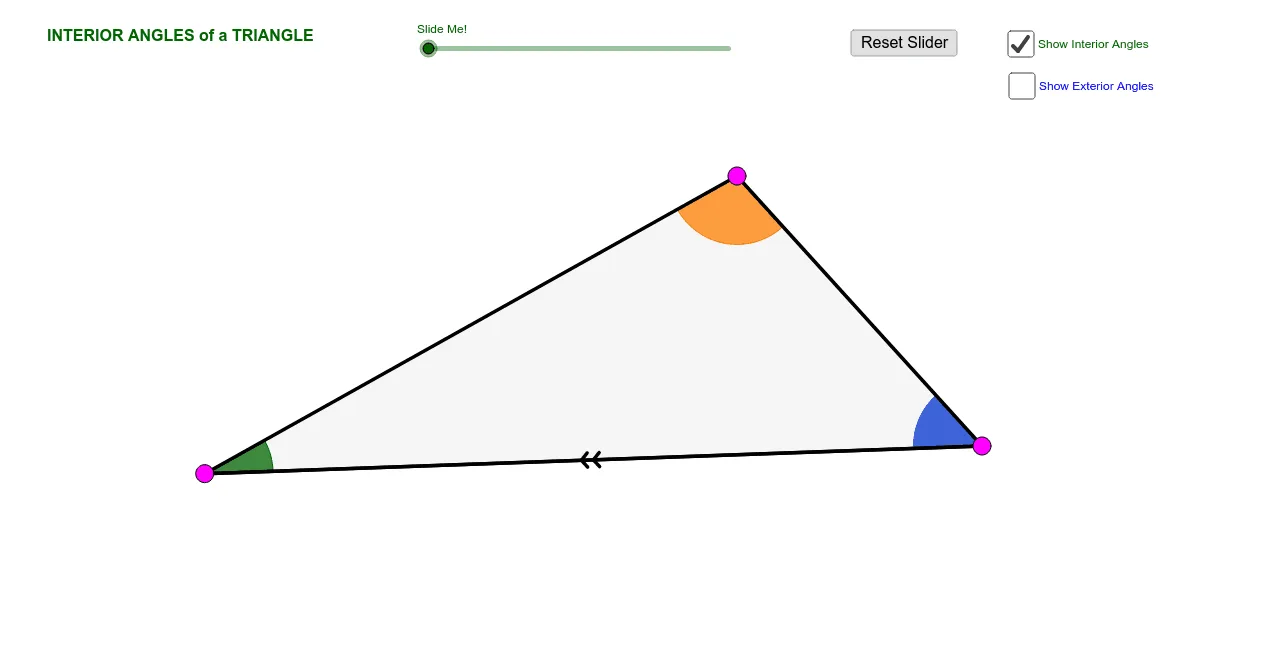
This GeoGebra applet demonstrates the Triangle Interior Angle Sum Theorem and Exterior Angle Theorem. It visualizes how the sum of interior angles equals 180 degrees and how an exterior angle relates to remote interior angles. Construction utilizes commands like Ray, Point, Angle, Polygon, Rotate, and Translate to create interactive geometric figures. Ideal for middle school geometry students and educators to explore angle properties dynamically.
GeoGebra Commands & Parameters
Ray(A, B) → aRay(B, C) → bRay(C, A) → cPoint(a) → D_1Point(b) → E_1Point(c) → F_1Ray(A, F_1) → dRay(B, D_1) → eRay(C, E_1) → fPoint(e) → DPoint(f) → EPoint(d) → FAngle(B, A, C) → αAngle(C, B, A) → βAngle(A, C, B) → γAngle(F, A, B) → δAngle(D, B, C) → εAngle(E, C, A) → ζCircle(A, 1.5) → gCircle(B, 1.5) → hCircle(C, 1.5) → kIntersect(g, c, 1) → GIntersect(g, a, 1) → HIntersect(g, c, 2) → IIntersect(h, b, 1) → JIntersect(h, a, 1) → KIntersect(h, a, 2) → LIntersect(k, b) → M, NIntersect(k, c) → O,CircleSector(A, H, G) → pCircleSector(B, J, K) → qCircleSector(C, O, M) → rCircleSector(C, N, O) → sCircleSector(B, L, J) → tCircleSector(A, I, H) → c_1Line(C, a) → iVector(B, C) → uVector(A, C) → vTranslate(q, u) → q'Segment(B, C) → lDilate(C, If[0 < j ≤ 1, j, 0], B) → C'Vector(B, C') → wTranslate(q, w) → q'_1Rotate(q'_1, If[0 < j, (((-j) * 180))°, 180*°], C') → d_1Mirror(q', C) → q''Dilate(A, If[1 < j ≤ 2, 2 - j, 0], C) → C'_1Vector(A, C'_1) → mTranslate(p, m) → p'Dilate(C, If[0 < n ≤ 1, n, 0], B) → C'_2Dilate(A, If[1 < n ≤ 2, 2 - n, 0], C) → A'Vector(B, C'_2) → u_1Vector(A, A') → v_1If(0 < n ≤ 1, Translate[t, u_1], Translate[t, u]) → e_1If(1 < n ≤ 2, Translate[c_1, v_1], Translate[c_1, v]) → f_1Polygon(A, B, C) → poly1, c_2, a_2, b_1Line(A, B) → g_1Segment(C, B) → j_1Ray(B, C) → k_1Midpoint(B, C) → PSegment(C, P) → l_1Segment(P, B) → m_1If(0 < j < 1, Rotate[B, ((j * 180))°, P]) → QIf(0 < j < 1, Rotate[q, ((j * 180))°, P]) → p_1If(0 < j < 1, Segment[Rotate[A, ((j * 180))°, P], Rotate[B, ((j * 180))°, P]]) → r_1Rotate(A, 180*°, P) → A'_1Rotate(B, 180*°, P) → B'Segment(A'_1, B') → s_1Segment(C, B) → t_1Segment(B, A) → q_1Segment(B, A) → b_2Midpoint(A, C) → RSegment(A, R) → d_2Segment(R, C) → e_2Segment(A, C) → h_2If(1 < j ≤ 2, Rotate[p, (((-(j - 1)) * 180))°, R]) → f_2Segment(A, C) → i_2If(1 < j ≤ 2, Segment[Rotate[A, (((-(j - 1)) * 180))°, R], Rotate[C, (((-(j - 1)) * 180))°, R]]) → j_2If(0 < j ≤ 1, Segment[Rotate[C, ((j * 180))°, P], Rotate[B, ((j * 180))°, P]]) → k_2If(1 < j ≤ 2, Segment[Rotate[B, (((-(j - 1)) * 180))°, R], Rotate[A, (((-(j - 1)) * 180))°, R]]) → i_1Ray(B, C) → n_1Ray(A, B) → g_2Ray(C, A) → l_2
AI Drawing Prompt Reference
Draw a triangle ABC with rays a, b, and c through points A, B, and C. Construct angles α, β, γ, δ, ε, and ζ using points A, B, C, and D, E, F. Draw circles centered at A, B, and C, and find intersection points G, H, I, J, K, L, M, N, and O. Use these points to construct sectors p, q, r, s, t, and c_1. Draw a line i through point C and use vectors u and v to construct new rays and sectors. Finally, use rotation, mirroring, and scaling to construct new sectors d_1 and q'', as well as new point C'_1 and sector p'.
The prompt above was compiled from the original drawing commands and is for reference only.