
Triangle Dilation Demonstration
Loading the math board and drawing, please wait…
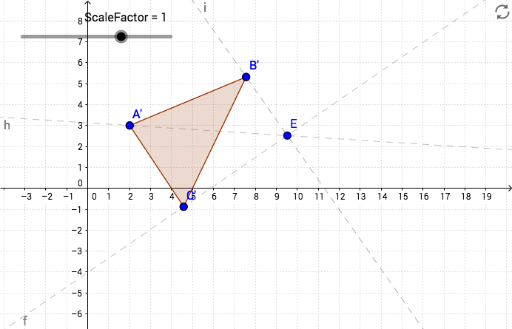
This example shows a triangle being dilated about a center with a variable scale factor, displaying the original triangle and its image side by side. Core concepts include similarity transformations, scale factor, proportional side lengths, area ratios, and the matrix representation of a linear dilation. Construction uses the Dilate command on vertices A, B, C to obtain A', B', C'; Distance to measure original and image side lengths; Line and Polygon to build the two triangles (poly1 and poly2); a ScaleFactor slider to control the ratio; and auxiliary objects f, h, i, c, a, b and their images c', a', b'. Suitable for middle‑school geometry (similarity and dilation), high‑school analytic geometry or introductory linear algebra, and as a GeoGebra teaching demo.
GeoGebra Commands & Parameters
Dilate(A, ScaleFactor, E) → A'Dilate(B, ScaleFactor, E) → B'Dilate(C, ScaleFactor, E) → C'Distance(A, B) → distanceABDistance(B, C) → distanceBCDistance(B', C') → distanceB'C'Distance(A', B') → distanceA'B'Line(E, C) → fLine(E, A) → hLine(E, B) → iPolygon(A, B, C) → poly1, c, a, bPolygon(A', B', C') → poly2, c', a', b'
AI Drawing Prompt Reference
Create a triangle dilation demonstration: draw an arbitrary triangle and a dilation center, add a slider for the scale factor, and generate the image triangle by scaling the original triangle about that center so the two triangles appear side by side. Draw three straight connectors from the center to the three vertices of the original triangle, and show the lengths of the three sides of the original triangle and the corresponding three sides of the image triangle to illustrate similarity and proportional relationships. Keep the diagram clean and suitable for a geometry teaching illustration.
The prompt above was compiled from the original drawing commands and is for reference only.