
Triangle Definition and Basic Elements Construction
Loading the math board and drawing, please wait…
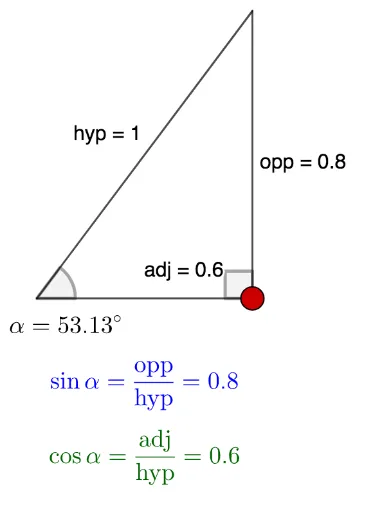
①This GeoGebra example dynamically demonstrates the definition of a triangle, showing a closed figure formed by three line segments and its basic elements (vertices, sides, angles). ②Core mathematical concepts include the composition of triangles, interior angles, and the relationships among hypotenuse, opposite side, and adjacent side in a right triangle, along with angle notation. ③Construction details: uses Intersect command to find intersection points, Semicircle to construct a semicircle, Point to define vertices, Segment to connect sides, Angle to mark angles, and text objects for labeling; involved objects include A, B, C, hyp, opp, adj, γ, α, etc. ④Suitable for middle school geometry introduction, helping students understand triangle definitions, naming conventions, and right triangle side-angle relationships; also useful for teacher demonstrations or student self-exploration.
GeoGebra Commands & Parameters
Intersect(xAxis, yAxis) → ASemicircle(B, A) → cPoint(c) → CSegment(A, B) → hypSegment(B, C) → oppSegment(C, A) → adjAngle(B, C, A) → γAngle(C, A, B) → α
AI Drawing Prompt Reference
Draw a triangle formed by three points A, B, and C, connected by three sides. Inside the triangle, mark angles γ and α. The figure should clearly show the definition and basic elements of a triangle, suitable for geometry learning.
The prompt above was compiled from the original drawing commands and is for reference only.