
Triangle Constructions: Dynamic Geometric Construction from Basic Elements
Loading the math board and drawing, please wait…
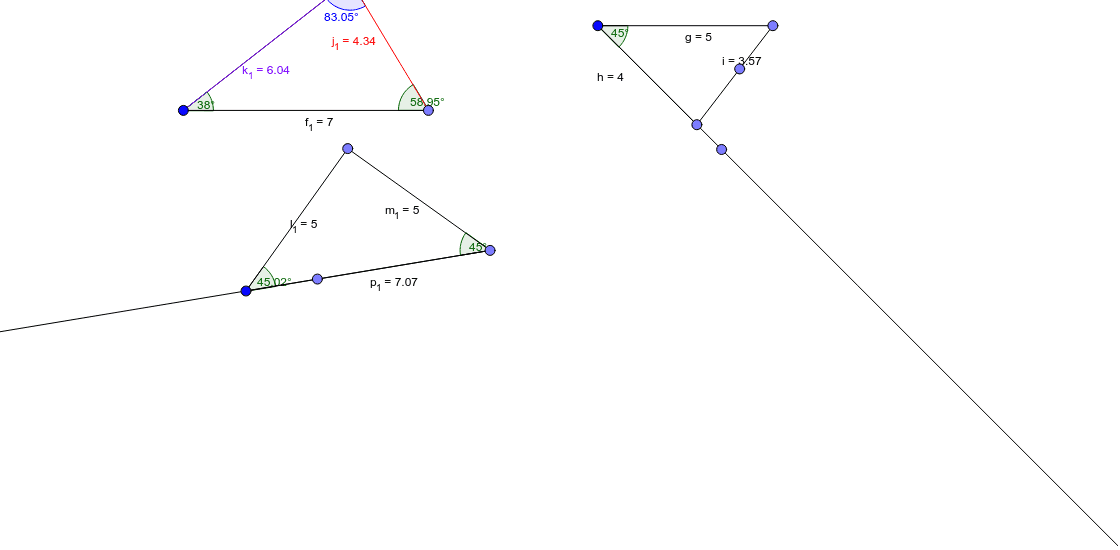
This GeoGebra example demonstrates the step-by-step construction of triangles and their associated elements, showcasing how basic geometric objects such as points, segments, rays, rotation angles, and angle measurements are combined to build complex figures. The core mathematical concepts involve triangle construction, rotational symmetry, angle relationships, and nested triangle configurations. The construction uses commands like Point, Segment, Rotate, Angle, and Ray, with objects including A, C, g, C', α, f, B, h, i, D, E, F, j, E', β, G, k, l, m, H, I, n, J, p, H'_1, δ, ε, ζ, K, L, M, r, N, s, t, a, γ, η, θ, q, reflecting a rich layering of geometric elements. It is suitable for middle and high school geometry teaching, geometric construction practice, and dynamic math exploration, helping students intuitively understand triangle properties and construction methods.
GeoGebra Commands & Parameters
Point(Circle[A, 5]) → CSegment(A, C) → gRotate(C, (-(45°)), A) → C'Angle(C', A, C) → αRay(A, C') → fPoint(Circle[A, 4]) → BSegment(A, B) → hSegment(C, B) → iPoint(i) → DPoint(Circle[E, 5]) → FSegment(E, F) → jRotate(E, (-(60°)), F) → E'Angle(E', F, E) → βPoint(Circle[F, 4]) → GSegment(F, G) → kSegment(E, G) → lRay(F, E') → mPoint(Circle[H, 4]) → ISegment(H, I) → nPoint(Circle[H, 5]) → JSegment(H, J) → pRotate(H, (-(60°)), I) → H'_1Angle(H'_1, I, H) → δAngle(F, E, G) → εAngle(E, G, F) → ζPoint(Circle[K, 21]) → LPoint(Circle[K, 6]) → MSegment(K, M) → rPoint(Circle[M, 5]) → NSegment(M, N) → sRay(I, H'_1) → tSegment(I, J) → aAngle(I, H, J) → γAngle(H, J, I) → ηAngle(N, M, K) → θRay(K, N) → qSegment(N, K) → bSegment(N, K) → cAngle(M, K, N) → ιAngle(K, N, M) → κPoint(Circle[O, 6]) → PSegment(O, P) → dPoint(Circle[P, 5]) → QSegment(P, Q) → eSegment(O, Q) → g_1Angle(Q, P, O) → μAngle(P, O, Q) → νPoint(Circle[P, 6]) → RSegment(P, R) → h_1Angle(O, Q, P) → λPoint(Circle[S, 7]) → TSegment(S, T) → f_1Rotate(T, 38°, S) → T'Angle(T, S, T') → ξAngle(U, T, S) → οRay(S, T') → i_1Segment(T, U) → j_1Segment(U, S) → k_1Angle(S, U, T) → ρPoint(Circle[V, 5]) → WSegment(V, W) → l_1Point(Circle[W, 5]) → ZSegment(W, Z) → m_1Rotate(W, 45°, Z) → W'Angle(W, Z, W') → σRay(Z, W') → n_1Angle(Z, V, W) → τSegment(V, Z) → p_1
AI Drawing Prompt Reference
Draw a geometric construction featuring multiple triangles with rotations and angle markings. Start by drawing circles with different radii centered at a point, placing points on the circles, and connecting them to form triangles. For one triangle, rotate a vertex around another vertex by a specific angle (e.g., 45° or 60°), then draw the resulting ray and angle arc. Repeat this process to create several nested or adjacent triangles, placing points on sides or inside triangles to form smaller ones. Finally, mark interior angles with arcs and display their measures. The overall figure should illustrate triangle construction, rotational symmetry, and angle relationships.
The prompt above was compiled from the original drawing commands and is for reference only.