
Triangle Construction with GeoGebra: Basic Geometry Exercise
Loading the math board and drawing, please wait…
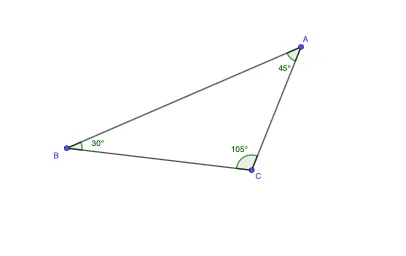
This GeoGebra example guides users through the construction of a triangle using fundamental commands (Segment, Polygon, Angle) and point objects. It demonstrates core geometric concepts such as triangle angle sum, side-length relationships, and conditions for similar triangles. The construction leverages basic point and command interactions among points A, B, C and angle variables α, β, γ. Suitable for middle-to-high school mathematics, it helps learners visualize triangle properties, reinforce geometric reasoning, and become familiar with GeoGebra's command-based drawing interface. Key concepts include triangle geometry, angle measurement, and similarity conditions, making it ideal for classroom demonstrations or independent practice.
GeoGebra Commands & Parameters
Segment(A, B) → fSegment(B, C) → gSegment(C, A) → hPolygon(A, B, C) → t1, c, a, bAngle(t1) → α, β, γ
AI Drawing Prompt Reference
Draw a triangle with three points A, B, and C, and connect them with line segments. Ensure the sum of the interior angles is 180 degrees and show basic geometric properties such as side length relationships and similarity conditions. This helps in understanding the importance of triangles in geometry.
The prompt above was compiled from the original drawing commands and is for reference only.