
Triangle - Base and Height
Loading the math board and drawing, please wait…
In collections
Folding paper, doing geometry figures
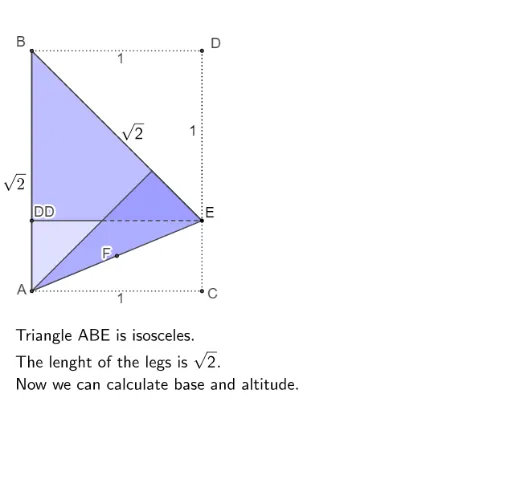
This example demonstrates how to draw a triangle's base and height using GeoGebra. Key math concepts include coordinate geometry, geometric construction, and triangle area calculation. Construction highlights involve commands like Polygon, Rotate, Segment, CircleArc, Line, AngularBisector, Intersect, and Midpoint. Suitable for high school students learning triangle properties and constructions.
GeoGebra Commands & Parameters
Polygon(A, C, D, B) → vierhoek1, a, c, d, bPolygon(B, A, C, E) → vierhoek2, b_1, a_1, c_1, ePolygon(B, E, D) → driehoek1, d_1, b_2, e_1Rotate(B, (((s - 1) * 180))°, d_1) → B'Rotate(E, (((s - 1) * 180))°, d_1) → E'Rotate(D, (((s - 1) * 180))°, d_1) → D'Polygon(B', E', D') → driehoek1', d', b', e'Rotate(B, 180°, d_1) → B'_1Rotate(E, 180°, d_1) → E'_1Rotate(D, 180°, d_1) → D'_1Polygon(B'_1, E'_1, D'_1) → driehoek1'_1, d'_1, b'_1, e'_1Segment(B, E) → fRotate(D, -90°, B) → DDCircleArc(B, DD, D) → gSegment(A, E) → hRotate(C, -135°, E) → C'CircleArc(E, C', C, xOyPlane) → kPolygon(A, C, E) → driehoek2, e_2, a_2, c_2Rotate(A, (((s - 3) * 180))°, h) → A'Rotate(C, -180°, h) → C'_1Rotate(E, (((s - 3) * (-180)))°, h) → E'_2Polygon(A, C'_1, E) → driehoek2', p, q, tPolygon(D'_1, A, E) → driehoek3, e_3, d'_2, a_3Polygon(A, C, E, DD) → vierhoek3, i, j, l, mLine(D'_1, E) → nAngularBisector(A, B, E) → rIntersect(p, b'_1) → FSegment(F, E) → g_1Segment(DD, F) → f_1Segment(B, D) → h_1Segment(D, E) → i_1Segment(A, C) → j_1Segment(C, E) → k_1Midpoint(A, E) → BBPolygon(A, BB, B) → driehoek4, b_3, a_4, bb
AI Drawing Prompt Reference
Draw a triangle's base and height to demonstrate coordinate geometry and geometric construction. Rotate the base and height, draw perpendicular and angle bisectors, and mark midpoints and intersections. Connect key points to form multiple triangles and quadrilaterals, clearly showing the triangle area calculation process.
The prompt above was compiled from the original drawing commands and is for reference only.