
Triangle Area Exploration
Loading the math board and drawing, please wait…
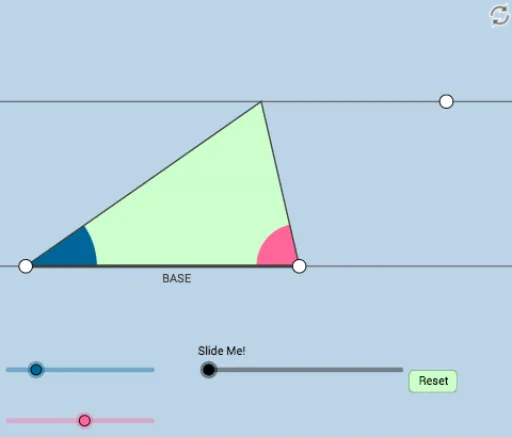
This applet explores the area of a triangle dynamically and modifiably, involving the area formula and its applications. Commands used include Rotate, Angle, Ray, Segment, Intersect, Midpoint, Line, OrthogonalLine, Polygon, Point, Circle, Dilate, etc. Suitable for middle school and above students or teachers.
GeoGebra Commands & Parameters
Rotate(A, α, B) → A'Angle(A, B, A') → γRay(B, A') → fRotate(B, (-β), A) → B'Angle(B', A, B) → δRay(A, B') → gSegment(B, A) → hIntersect(f, g) → CSegment(B, C) → iSegment(A, C) → jMidpoint(i) → DMidpoint(j) → ELine(B, A) → lOrthogonalLine(C, l) → mIntersect(l, m) → FSegment(C, F) → nPolygon(D, E, C) → poly1, c, d, eMidpoint(n) → GLine(C, l) → pPolygon(B, D, E, A) → poly2, b, d_1, e_1, aSegment(D, C) → qSegment(B, A) → rPoint(p) → HOrthogonalLine(H, p) → tIntersect(l, t) → ISegment(H, I) → sCircle(I, 3) → c_1Circle(H, 3) → f_1Intersect(f_1, p, 1) → JIntersect(f_1, p, 2) → KIntersect(c_1, l, 2) → LIntersect(c_1, s, 1) → MIntersect(c_1, l, 1) → NAngle(J, H, I) → εAngle(M, I, N) → ζDilate(H, If[0 < k ≤ 1, 1 - k, 0], I) → H'Segment(H, H') → g_1Angle(C, F, B) → ηDilate(C, If[1 < k ≤ 2, 2 - k, 0], G) → C'Segment(C, C') → h_1Dilate(G, If[2 < k ≤ 3, 3 - k, 0], F) → G'Segment(G, G') → i_1Rotate(C, If[3 < k ≤ 4, ((-(k - 3)) * π), (-π)], G) → C'_1Rotate(C', If[3 < k ≤ 4, ((-(k - 3)) * π), (-π)], G) → C''Segment(C'_1, C'') → j_1Dilate(G, If[4 < k ≤ 5, 5 - k, 0], D) → G'_1Dilate(G, If[4 < k ≤ 5, 5 - k, 0], E) → G'_2Segment(G, G'_1) → k_1Segment(G, G'_2) → l_1Segment(B, F) → m_1Segment(B, D) → n_1Segment(D, G) → p_1Segment(D, C) → q_1Min({m_1, n_1, p_1, q_1}) → oCircle(B, (0.6 * o)) → r_1Intersect(r_1, l) → O, PSegment(B, C) → s_1Intersect(r_1, s_1, 1) → QCircleSector(B, P, Q) → t_1Rotate(D, If[6 < k ≤ 7, ((-(k - 6)) * π), (-π)], E) → D'Rotate(E, If[6 < k ≤ 7, ((-(k - 6)) * π), (-π)], E) → E'Rotate(C, If[6 < k ≤ 7, ((-(k - 6)) * π), (-π)], E) → C'_2Polygon(D', E', C'_2) → poly1', c'_2, d', e'Segment(D, C) → a_1Segment(D, B) → b_1Segment(C, E) → f_2Segment(E, A) → g_2Segment(E, C'_2) → h_2Segment(C'_2, D') → i_2Segment(D', E) → j_2Dilate(D, If[7 < k ≤ 8, 8 - k, 0], C) → D'_1Segment(D, D'_1) → k_2Dilate(B, If[8 < k ≤ 9, 9 - k, 0], D) → B'_1Vector(B, B'_1) → uTranslate(t_1, u) → c_2Dilate(B, If[9 < k ≤ 10, 10 - k, 0], A) → B'_2Vector(B, B'_2) → vTranslate(t_1, v) → d_2Circle(A, Radius[r_1]) → e_2Intersect(e_2, l, 1) → RIntersect(e_2, g_2, 1) → SSegment(B, A) → l_2Segment(A, C) → m_2Min({l_2, m_2}) → wCircle(A, (0.25 * w)) → p_2Intersect(g_2, m_2) → TIntersect(g_2, m_2) → UIntersect(p_2, m_2) → V,Intersect(p_2, l_2) → W,CircleSector(A, V, W) → q_2Segment(B, A) → n_2
AI Drawing Prompt Reference
Draw a triangle and dynamically explore its area. Start by creating the triangle's vertices and sides, then use rotations and angle calculations to find new points and rays. Locate intersection points and construct auxiliary shapes using midpoints and perpendicular lines. Draw parallel and orthogonal lines to find key points, connecting them to form polygons. Finally, demonstrate the area formula application through dilation and rotation, emphasizing key geometric relationships with circles and segments.
The prompt above was compiled from the original drawing commands and is for reference only.