
Triangle Area Challenge: Dynamic Geometry Calculation with Vectors
Loading the math board and drawing, please wait…
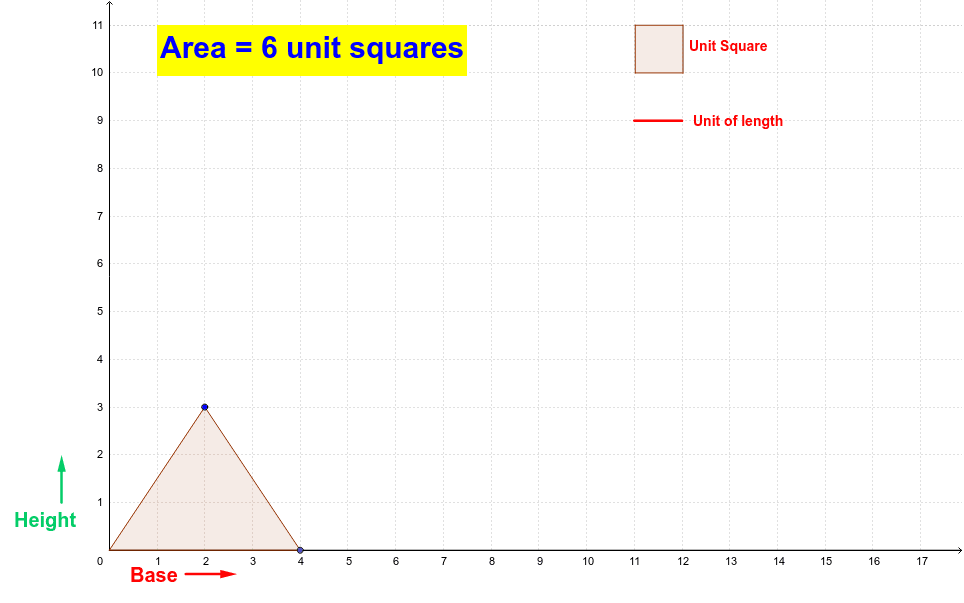
This GeoGebra example demonstrates the dynamic calculation and verification of triangle area. It covers core mathematical concepts including vector operations, polygon properties, and geometric relationships between points and segments. The construction relies on specific GeoGebra commands such as Intersect, Vector, Polygon, Point, and Segment to create interactive graphics. It is ideal for middle school geometry students or math competition training, facilitating an intuitive understanding of area formula derivation.
GeoGebra Commands & Parameters
Intersect(xAxis, yAxis) → DVector(E, F) → uVector(G, H) → vPolygon(I, J, K, L) → poly2, i, j, k, lPoint(yAxis) → ASegment(M, N) → dIntersect(xAxis, yAxis) → BPoint(xAxis) → CSegment(B, C) → aPoint(a) → OPolygon(B, O, P) → poly1, p, b, o
AI Drawing Prompt Reference
Draw a triangle ABC with A on the y-axis, B on the x-axis, and C on the x-axis. Define vectors u and v from points E to F and G to H respectively. Construct a quadrilateral IJKL and define a polygon with points I, J, K, and L. Draw a line segment d from M to N. Mark the intersection of the x-axis and y-axis as points B and C. Draw a line segment OB at point O, and finally construct a triangle with points B, O, and P.
The prompt above was compiled from the original drawing commands and is for reference only.