
Triangle Area Calculation by Ooi Soo Huat
Loading the math board and drawing, please wait…
In collections
Mathematics Form 1
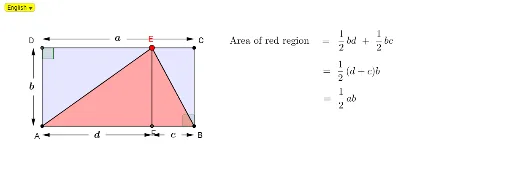
This example demonstrates how to dynamically calculate the area of a triangle using GeoGebra. Key math concepts include coordinate geometry, vectors, polygon construction, and geometric drawing. The construction involves commands and objects like Line, Point, Intersect, Polygon, Vector, and Angle as per the summary. Suitable for high school mathematics teaching to understand the area formula and dynamic geometric properties.
GeoGebra Commands & Parameters
Line(A, xAxis) → aLine(A, yAxis) → bPoint(a) → BLine(B, b) → cPoint(c) → CLine(C, a) → dPoint(d) → GIntersect(b, d) → DIf(NearC ≟ true, C, If[NearD ≟ true, D, G]) → PmDynamicCoordinates(G, x(Pm), y(Pm)) → EPolygon(A, E, B) → poly1, b_1, a_1, eOrthogonalLine(E, d) → fIntersect(a, f) → FPolygon(E, D, A) → poly2, a_2, e_1, d_1Polygon(E, C, B) → poly3, b_2, e_2, c_1Polygon(B, F, E) → poly4, e_3, b_3, f_1Polygon(A, E, F) → poly5, f_2, a_3, e_4Midpoint(F, A) → HMidpoint(F, B) → IMidpoint(A, D) → JMidpoint(B, C) → KMidpoint(A, B) → LMidpoint(D, C) → MCircle(D, ja) → gCircle(A, ja) → hCircle(J, ja) → kLine(J, K) → iIntersect(g, d, 1) → NCircle(K, ja) → pIntersect(k, b, 2) → OIntersect(p, c, 2) → PIntersect(k, b, 1) → QIntersect(p, c, 1) → RLine(O, P) → jLine(Q, R) → lCircle(O, ja) → qCircle(Q, ja) → sIntersect(q, j, 1) → SIntersect(s, l, 1) → TVector(S, N) → uIntersect(h, a, 1) → UVector(T, U) → vCircle(C, ja) → rIntersect(g, b, 2) → VIntersect(r, c, 2) → WCircle(M, ja) → tIntersect(t, d) → Z, A_1Circle(L, ja) → g_1Intersect(g_1, a) → B_1, C_1Line(C_1, A_1) → mLine(B_1, Z) → nCircle(A_1, ja) → h_1Circle(Z, ja) → k_1Intersect(h_1, m, 2) → D_1Intersect(k_1, n, 2) → E_1Vector(D_1, W) → wVector(E_1, V) → u_1If(x(E) < x(D), "c", "d") → TdCircle(H, ja) → p_1Intersect(p_1, a) → F_1, G_1Line(G_1, f) → i_1Line(F_1, i_1) → j_1Circle(G_1, ja) → q_1Circle(F_1, ja) → r_1Intersect(q_1, i_1, 1) → H_1Intersect(r_1, j_1, 1) → I_1Circle(F, ja) → s_1Intersect(s_1, a) → J_1, K_1Intersect(h, b, 1) → L_1Circle(B, ja) → d_2Intersect(d_2, c, 1) → O_1Intersect(s_1, f, 1) → M_1Circle(I, ja) → t_1Intersect(t_1, a) → N_1, P_1Line(P_1, c) → l_1Line(N_1, c) → m_1Circle(N_1, ja) → c_2Circle(P_1, ja) → g_2Intersect(c_2, m_1, 1) → Q_1Intersect(g_2, l_1, 1) → R_1If(x(E) < x(C), Vector[Q_1, M_1], Vector[R_1, M_1]) → n_1If(x(E) < x(C), Vector[R_1, O_1], Vector[Q_1, O_1]) → u_2If(x(E) > x(D), Vector[H_1, M_1], Vector[I_1, M_1]) → w_1If(x(E) > x(D), Vector[I_1, L_1], Vector[H_1, L_1]) → v_1Circle(P, ja) → h_2Circle(R, ja) → k_2Intersect(h_2, j, 2) → S_1Intersect(k_2, l, 2) → T_1Intersect(r, d, 2) → U_1Intersect(d_2, a, 2) → V_1Vector(S_1, U_1) → v_2Vector(T_1, V_1) → w_2Angle(A, D, E) → αAngle(E, B, A) → βAngle(E, F, B) → γAngle(E, C, B) → δAngle(B, A, E) → εAngle(C, B, A) → ζAngle(A, F, E) → ηAngle(A, D, C) → θFractionText(0.5) → text7SelectedIndex(Bahasa) → nnIf(nn ≟ 1, LaTeX["\text{Area of red region = }"], LaTeX["\text{Luas rantau merah = }"]) → Tex1
AI Drawing Prompt Reference
Draw a triangle with dynamic area calculation. Start by plotting the coordinate axes and determining the triangle's vertices, then connect them to form the triangle. Next, identify key points using intersections and vectors, and construct auxiliary shapes like perpendicular lines, circles, and quadrilaterals. Finally, illustrate the area calculation process, incorporating midpoints, vectors, and helper shapes.
The prompt above was compiled from the original drawing commands and is for reference only.