
Triangle Area Action!!! (V2)
Loading the math board and drawing, please wait…
In collections
Congruence (CO) Cluster
Congruence (Vol 2)
CCSS High School: Geometry (Congruence) Volume 2
CCSS High School: Geometry (Congruence) Volume 2
CCSS High School: Geometry (Congruence) Volume 2
Geometry (Congruence) Volume 2
CCSS High School: Geometry (Congruence) Volume 2
CCSS High School: Geometry (Congruence) Volume 2
CCSS High School: Geometry (Congruence) Volume 2
CCSS High School: Geometry (Congruence) Volume 2
CCSS High School: Geometry (Congruence) Volume 2
CCSS High School: Geometry (Congruence) Volume 2
Gail LeBlancCCSS High School: Geometry (Congruence) Volume 2
CCSS High School: Geometry (Congruence) Volume 2
Area, Surface Area, Volume, Cross Section, 3D
Perimeter & Area
Perimeter & Area
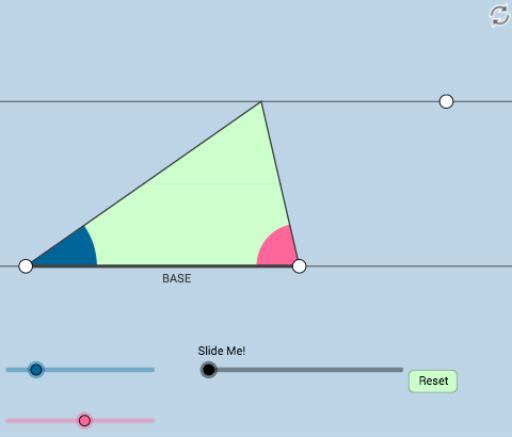
① This interactive GeoGebra applet dynamically demonstrates the area of a triangle through a modifiable discovery-investigation design, complete with key questions for guided learning. ② Core mathematical concepts include the triangle area formula, base-height relationships, the connection between triangle and parallelogram areas, and area invariance under transformations such as rotation and translation. ③ Construction highlights: using GeoGebra commands like Rotate, Translate, Dilate to create dynamic triangle and auxiliary shapes; Polygon for area regions; Angle, Ray, Segment, Line, OrthogonalLine for geometric relations; Midpoint, Intersect, Circle, CircleSector for additional structure; and sliders or draggable points for real-time manipulation. ④ Suitable for middle and high school geometry classes, teacher-created exploratory lessons, or student self-discovery of area formulas and their derivations.
GeoGebra Commands & Parameters
Rotate(A, α, B) → A'Angle(A, B, A') → γRay(B, A') → fRotate(B, (-β), A) → B'Angle(B', A, B) → δRay(A, B') → gSegment(B, A) → hIntersect(f, g) → CSegment(B, C) → iSegment(A, C) → jMidpoint(i) → DMidpoint(j) → ELine(B, A) → lOrthogonalLine(C, l) → mIntersect(l, m) → FSegment(C, F) → nPolygon(D, E, C) → poly1, c, d, eMidpoint(n) → GLine(C, l) → pPolygon(B, D, E, A) → poly2, b, d_1, e_1, aSegment(D, C) → qSegment(B, A) → rPoint(p) → HOrthogonalLine(H, p) → tIntersect(l, t) → ISegment(H, I) → sCircle(I, 3) → c_1Circle(H, 3) → f_1Intersect(f_1, p, 1) → JIntersect(f_1, p, 2) → KIntersect(c_1, l, 2) → LIntersect(c_1, s, 1) → MIntersect(c_1, l, 1) → NAngle(J, H, I) → εAngle(M, I, N) → ζDilate(H, If[0 < k ≤ 1, 1 - k, 0], I) → H'Segment(H, H') → g_1Angle(C, F, B) → ηDilate(C, If[1 < k ≤ 2, 2 - k, 0], G) → C'Segment(C, C') → h_1Dilate(G, If[2 < k ≤ 3, 3 - k, 0], F) → G'Segment(G, G') → i_1Rotate(C, If[3 < k ≤ 4, ((-(k - 3)) * π), (-π)], G) → C'_1Rotate(C', If[3 < k ≤ 4, ((-(k - 3)) * π), (-π)], G) → C''Segment(C'_1, C'') → j_1Dilate(G, If[4 < k ≤ 5, 5 - k, 0], D) → G'_1Dilate(G, If[4 < k ≤ 5, 5 - k, 0], E) → G'_2Segment(G, G'_1) → k_1Segment(G, G'_2) → l_1Segment(B, F) → m_1Segment(B, D) → n_1Segment(D, G) → p_1Segment(D, C) → q_1Min({m_1, n_1, p_1, q_1}) → oCircle(B, (0.6 * o)) → r_1Intersect(r_1, l) → O, PSegment(B, C) → s_1Intersect(r_1, s_1, 1) → QCircleSector(B, P, Q) → t_1Rotate(D, If[6 < k ≤ 7, ((-(k - 6)) * π), (-π)], E) → D'Rotate(E, If[6 < k ≤ 7, ((-(k - 6)) * π), (-π)], E) → E'Rotate(C, If[6 < k ≤ 7, ((-(k - 6)) * π), (-π)], E) → C'_2Polygon(D', E', C'_2) → poly1', c'_2, d', e'Segment(D, C) → a_1Segment(D, B) → b_1Segment(C, E) → f_2Segment(E, A) → g_2Segment(E, C'_2) → h_2Segment(C'_2, D') → i_2Segment(D', E) → j_2Dilate(D, If[7 < k ≤ 8, 8 - k, 0], C) → D'_1Segment(D, D'_1) → k_2Dilate(B, If[8 < k ≤ 9, 9 - k, 0], D) → B'_1Vector(B, B'_1) → uTranslate(t_1, u) → c_2Dilate(B, If[9 < k ≤ 10, 10 - k, 0], A) → B'_2Vector(B, B'_2) → vTranslate(t_1, v) → d_2Circle(A, Radius[r_1]) → e_2Intersect(e_2, l, 1) → RIntersect(e_2, g_2, 1) → SSegment(B, A) → l_2Segment(A, C) → m_2Min({l_2, m_2}) → wCircle(A, (0.25 * w)) → p_2Intersect(g_2, m_2) → TIntersect(g_2, m_2) → UIntersect(p_2, m_2) → V,Intersect(p_2, l_2) → W,CircleSector(A, V, W) → q_2Segment(B, A) → n_2
AI Drawing Prompt Reference
Draw a dynamic triangle area demonstration. Start with a base segment and two vertices, then construct the third vertex by rotating rays and finding their intersection. Connect the midpoints of the two sides and draw a perpendicular from the third vertex to the base, marking the height. Form an inner triangle and a trapezoid using the midpoints and vertices. Add a slider to animate transformations: sequentially translate, rotate, or scale parts of the triangle to show area invariance. Above the base, draw a parallel line with two small circles and angle marks for draggable auxiliary points. Use segments, polygons, and angle symbols to clearly show area relationships.
The prompt above was compiled from the original drawing commands and is for reference only.