
Triangle and Orthocenter Phenomenon
Loading the math board and drawing, please wait…
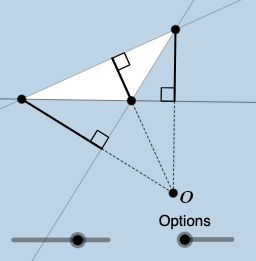
This example demonstrates the geometric relationship between a triangle and its orthocenter. Key mathematical concepts include triangle properties, orthocenter definition, and geometric construction methods. Construction involves GeoGebra commands such as Rotate, OrthogonalLine, Intersect, etc. Suitable for middle or high school mathematics education to understand geometric transformations and properties.
GeoGebra Commands & Parameters
Rotate(A, ((-e) * pi / 180), B) → A'Ray(B, A') → qPoint(q) → CPolygon(A, B, C) → poly1, c, a, bLine(A, B) → fSegment(A, C) → gSegment(C, B) → hOrthogonalLine(C, f) → iIntersect(f, i) → DDilate(C, If[0 < d ≤ 1, 1 - d, 0], D) → C'Segment(C, C') → jSegment(C, D) → kAngle(C, C', A) → αLine(A, C) → lLine(B, C) → mOrthogonalLine(B, l) → nIntersect(l, n) → EDilate(B, If[1.5 < d ≤ 2.5, 2.5 - d, 0], E) → B'Segment(B, B') → pAngle(B, E, C) → βOrthogonalLine(A, m) → rIntersect(m, r) → FDilate(A, If[3 < d ≤ 4, 4 - d, 0], F) → A'_{1}Segment(A, A'_{1}) → sAngle(B, F, A) → γLine(C, D) → tLine(E, B) → f_1Line(A, F) → g_1Intersect(t, f_1) → GDilate(D, If[5 < d ≤ 6, 6 - d, 0], G) → D'Dilate(E, If[5 < d ≤ 6, 6 - d, 0], G) → E'Dilate(F, If[5 < d ≤ 6, 6 - d, 0], G) → F'Segment(F, F') → h_1Segment(E, E') → i_1Segment(D, D') → j_1Angle(C, B, A) → δPolygon(C, B, GG) → t1, gg, c_1, b_1Segment(C, GG) → k_1Segment(GG, B) → l_1Segment(B, C) → m_1Line(B, GG) → n_1Intersect(l, n_1) → HAngle(C, H, B) → εSegment(C, H) → p_1Segment(H, AA) → q_1OrthogonalLine(AA, m) → r_1Intersect(m, r_1) → ISegment(GG, I) → s_1Angle(GG, I, B) → ζSegment(I, AA) → t_1Line(C, GG) → a_1OrthogonalLine(B, a_1) → d_1Intersect(a_1, d_1) → JAngle(C, J, B) → ηSegment(B, J) → e_1Segment(B, AA) → f_2Line(C, B) → g_2Line(A, C) → h_2Polygon(A, B, GG) → t2, i_2, a_2, b_2Line(B, GG) → j_2Line(B, A) → k_2Line(A, GG) → l_2OrthogonalLine(GG, k_2) → m_2Intersect(k_2, m_2) → KSegment(GG, K) → n_2Segment(K, C) → p_2Angle(B, K, GG) → θOrthogonalLine(B, l_2) → q_2Intersect(q_2, l_2) → LAngle(B, L, A) → ιSegment(B, L) → r_2Segment(B, C) → s_2OrthogonalLine(A, j_2) → t_2Intersect(j_2, t_2) → MAngle(A, M, B) → κSegment(A, M) → c_2Segment(M, C) → d_2Polygon(A, C, G) → t3, g_3, a_3, c_3Line(A, G) → e_2Line(G, C) → f_3Line(C, A) → h_3OrthogonalLine(C, e_2) → i_3Intersect(e_2, i_3) → NAngle(C, N, G) → λSegment(C, N) → j_3Segment(N, B) → k_3OrthogonalLine(A, f_3) → l_3Intersect(f_3, l_3) → OSegment(A, O) → m_3Angle(G, O, A) → μSegment(O, B) → n_3OrthogonalLine(G, h_3) → p_3Intersect(h_3, p_3) → PAngle(G, P, A) → νSegment(G, P) → q_3Segment(G, B) → r_3
AI Drawing Prompt Reference
Draw an acute triangle ABC with its three altitudes. Start construction from one vertex, obtain another point through rotation to form the triangle. Draw perpendicular lines from each vertex to the opposite side, and mark the three foot points D, E, and F. Create dilated images of these foot points relative to a certain point. Label several angles to verify geometric relationships, such as angle C'CA, angle BEC, and angle BFA. The overall display shows the orthocenter properties and altitude intersection relationships of the triangle.
The prompt above was compiled from the original drawing commands and is for reference only.