
Triangle and Area
Loading the math board and drawing, please wait…
In collections
barycentric coordinates
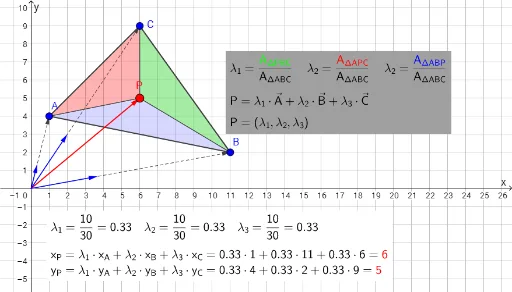
This example demonstrates how to draw a triangle and calculate its area using GeoGebra. Key concepts include coordinate geometry, vectors, and properties of triangles. Using commands like Polygon, PointIn, and Vector, one can construct a triangle and calculate its area. Suitable for students in middle school and above learning geometric construction and area calculation.
GeoGebra Commands & Parameters
Polygon(A, B, C) → driehoek1, c, a, bPointIn(driehoek1) → PPolygon(P, B, C) → driehoek2, c_1, d, b_1Polygon(A, P, C) → driehoek3, c_2, a_1, d_1Polygon(A, B, P) → driehoek4, d_2, a_2, b_2Vector(A) → oaVector(B) → obVector(C) → oc