
Triangle 2 - Dimensions
Loading the math board and drawing, please wait…
In collections
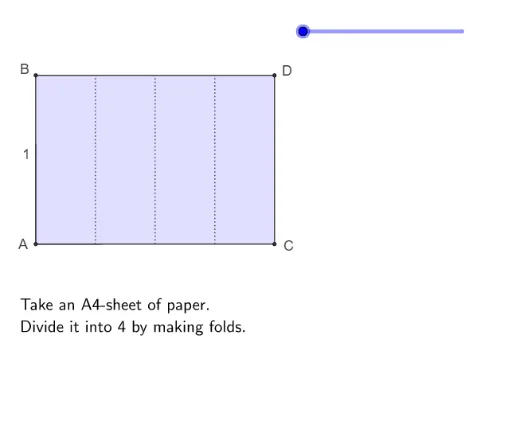
Folding paper, doing geometry figures
This example demonstrates how to construct an isosceles triangle using GeoGebra and explore its properties. Key mathematical concepts include the properties of isosceles triangles, midpoints, rotations, angle bisectors, and reflections. By using commands like Polygon, Segment, Midpoint, Rotate, and AngularBisector, students can understand the basics of geometric construction. Suitable for middle school and above students to learn about geometric construction and properties of isosceles triangles.
GeoGebra Commands & Parameters
Polygon(A, C, D, B) → vierhoek1, a, c, d, bSegment((sqrt(2) / 4, 0), (sqrt(2) / 4, 1)) → fSegment((sqrt(2) / 2, 0), (sqrt(2) / 2, 1)) → gSegment(((3 * sqrt(2) / 4), 0), ((3 * sqrt(2) / 4), 1)) → hMidpoint(B, D) → ERotate(D, -90°, E) → DDCircleArc(E, DD, D) → eIntersect(e, h, 1) → FCircleArc(E, F, D) → kAngularBisector(F, E, D) → iIntersect(i, c) → GSegment(E, G) → jPolygon(A, C, G, E, B) → veelhoek1, a_1, c_1, g_1, e_1, b_1Polygon(E, D, G) → driehoek1, g_2, e_2, d_1Rotate(E, (((-(s - 1)) * 180))°, g_1) → E'Rotate(D, (((-(s - 1)) * 180))°, g_1) → D'Rotate(G, (((-(s - 1)) * 180))°, g_1) → G'Polygon(E', D', G') → driehoek1', g', e', d'Polygon(E, F, G) → driehoek2, g_3, e_3, f_1Segment(E, D) → lSegment(D, G) → mOrthogonalLine(F, a_1) → nIntersect(j, d') → HHIntersect(j, d') → IIIntersect(n, j) → RIntersect(n, a_1) → SSegment(R, S) → pSegment(F, S) → qMirror(F, g) → HMirror(G, g) → ISegment(I, E) → rCircleArc(E, B, H) → tPolygon(I, E, B) → driehoek3, b_2, i_1, e_4Rotate(I, (((s - 3) * 180))°, r) → I'Rotate(E, (((s - 3) * 180))°, r) → E'_1Rotate(B, (((s - 3) * 180))°, r) → B'Polygon(I', E'_1, B') → driehoek3', b', i', e'_1Polygon(E, I, A, C, G) → veelhoek2, e_5, i_2, a_2, c_2, g_4Segment(B, E) → h_1Segment(B, I) → j_1Mirror(R, g) → TTMirror(S, g) → SSSegment(SS, TT) → k_1Segment(SS, H) → l_1Polygon(I, H, E) → driehoek4, e_6, i_3, h_2Circle(G, C) → p_1Intersect(d', f_1) → JIntersect(d', f_1) → KIntersect(d', f_1) → LIntersect(d', f_1) → MIntersect(p_1, f_1) → N,CircleArc(G, N, C) → q_1Line(G, F) → m_1Intersect(m_1, a_2) → OSegment(O, F) → n_1Polygon(O, C, G) → driehoek5, g_5, o, c_3Rotate(O, (((s - 5) * 180))°, c_3) → O'Rotate(C, (((s - 5) * 180))°, c_3) → C'Rotate(G, (((s - 5) * 180))°, c_3) → G'_1Polygon(O', C', G'_1) → driehoek5', g'_1, o', c'Polygon(I, A, O, G, E) → veelhoek3, i_4, a_3, o_1, g_6, e_7Mirror(O, n_1) → O'_1Mirror(C, n_1) → C'_1Mirror(G, n_1) → G'_2Polygon(O'_1, C'_1, G'_2) → driehoek5'_1, g'_2, o'_1, c'_1Mirror(O, g) → O'_2Mirror(C, g) → C'_2Mirror(G, g) → G'_3Polygon(O'_2, C'_2, G'_3) → driehoek5'_2, g'_3, o'_2, c'_2Rotate(O, (((s - 5) * 180))°, c_3) → O'_3Rotate(G, (((s - 5) * 180))°, c_3) → G'_4Rotate(O'_2, (((-(s - 6)) * 180))°, c'_2) → QRotate(G'_3, (((-(s - 6)) * 180))°, c'_2) → UIntersect(c', o_1) → VIntersect(c', o_1) → WIntersect(c', o_1) → ZLine(I, H) → r_1Intersect(o_1, r_1) → TSegment(O, C) → s_1Segment(C, G) → t_1Polygon(I, A, O, T) → vierhoek2, i_5, a_4, o_2, t_2Rotate(I, (((-(s - 7)) * 180))°, t_2) → I'_1Rotate(A, (((-(s - 7)) * 180))°, t_2) → A'Rotate(O, (((-(s - 7)) * 180))°, t_2) → O'_4Rotate(T, (((-(s - 7)) * 180))°, t_2) → T'Polygon(I, T, G, E) → vierhoek3, i_6, t_3, g_7, e_8Segment(E, T) → f_2Segment(T, E) → j_2Intersect(Segment[O, N], j_2) → A_1Segment(A_1, E) → k_2Rotate(I, (((-(s - 7)) * 180))°, i_6) → I'_2Rotate(A, (((-(s - 7)) * 180))°, i_6) → A'_1Rotate(O, (((-(s - 7)) * 180))°, i_6) → O'_5Rotate(T, (((-(s - 7)) * 180))°, i_6) → T'_1Polygon(I'_2, A'_1, O'_5, T'_1) → vierhoek2', i'_2, a'_1, o'_5, t'_1Mirror(N, g) → NNCircleArc(I, A, NN) → d_2Segment(I, T) → l_2Intersect(g'_2, l_2) → B_1Polygon(N, B_1, T, G) → vierhoek4, n_2, b_3, t_4, g_8Segment(I, A) → m_2Segment(A, O) → p_2Midpoint(B, E) → C_1Midpoint(I, G) → D_1Midpoint(E, D) → E_1Mirror(O, l_2) → OOMirror(A, l_2) → AAPolygon(I, T, OO, AA) → vierhoek5, i_7, t_5, oo, aaSegment(B_1, OO) → s_2Intersect(i_3, oo) → F_1Polygon(F_1, OO, E) → driehoek6, e_9, f_3, oo_1Polygon(E, T, G) → driehoek7, g_9, e_{10}, t_6Rotate(E, (((-(s - 9)) * 180))°, g) → E'_2Rotate(T, (((-(s - 9)) * 180))°, g) → T'_2Rotate(G, (((-(s - 9)) * 180))°, g) → G'_5Polygon(E'_2, T'_2, G'_5) → driehoek7', g'_5, e'_2, t'_2Segment(E, T) → h_3Segment(OO, E) → j_3Polygon(I, T, E) → driehoek8, e_{11}, i_8, t_7OrthogonalLine(I, e_6) → q_2OrthogonalLine(G, e_3) → r_2Intersect(r_2, q_2) → G_1CircleArc(G_1, I, G) → d_3Angle(E, G, O) → αAngle(T, I, E) → βSegment(E, G) → k_3Segment(T, G) → l_3Midpoint(I, G) → MMAngle(MM, E, G) → εSegment(MM, G) → m_3Segment(I, MM) → n_3
AI Drawing Prompt Reference
Draw an isosceles triangle ABC with base BC on the x-axis and vertex A on the y-axis. First, draw the base BC, then find the midpoint E of BC and rotate point D around E to get D'. Next, construct the base and legs of the isosceles triangle using lines and angle bisectors, and reflect to create the altitude and median. Finally, use rotation and reflection to obtain the symmetric image of the isosceles triangle.
The prompt above was compiled from the original drawing commands and is for reference only.