
Trapezoid with Midsegment Construction
Loading the math board and drawing, please wait…
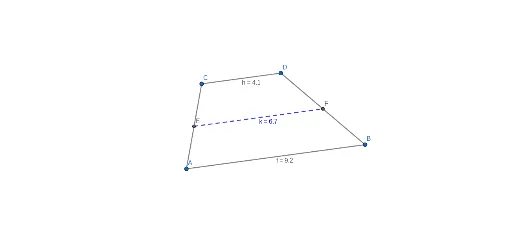
This GeoGebra example demonstrates the construction of a trapezoid and its midsegment, the segment connecting the midpoints of the two non-parallel sides. It visually illustrates that the midsegment is parallel to both bases and its length equals half the sum of the base lengths. Core mathematical concepts include trapezoids, midpoints, parallel lines, segment ratios, and vector relationships. The construction uses GeoGebra commands such as Segment, Line, Point, and Midpoint to create vertices A, B, C, D, bases f and g, legs h, i, j, and midpoints E and F, then connects E and F to form the midsegment k. This resource is ideal for middle school or high school geometry classes to explore the trapezoid midsegment theorem, and can be used as an interactive demonstration where dragging vertices reveals how the midsegment length relates to the bases.
GeoGebra Commands & Parameters
Segment(A, B) → fLine(C, f) → gPoint(g) → DSegment(C, D) → hSegment(A, C) → iSegment(D, B) → jMidpoint(i) → EMidpoint(j) → FSegment(E, F) → k
AI Drawing Prompt Reference
Draw a trapezoid with a lower base segment. From one endpoint of the lower base, construct a line parallel to it to serve as the upper base line, and place a point on this line to define the upper base's other endpoint. Connect the corresponding endpoints of the two bases to form the two legs. Then mark the midpoints of both legs and connect them with a segment, which is the midsegment. The midsegment should be parallel to both bases and its length equals half the sum of the base lengths.
The prompt above was compiled from the original drawing commands and is for reference only.