
Trapezoid to Rectangle Dissection
Loading the math board and drawing, please wait…
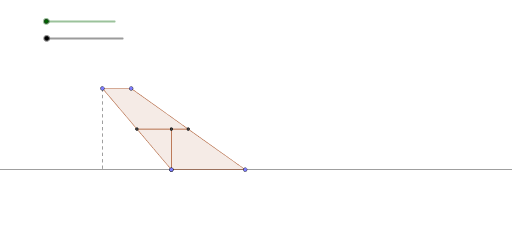
This example demonstrates how to dissect a trapezoid into a rectangle. It involves core mathematical concepts such as polygons, geometric transformations, vector operations, and coordinate geometry. Key GeoGebra commands/objects used in the construction include Line, Point, Polygon, Midpoint, Rotate, OrthogonalLine, Intersect, Vector, Translate, and Segment. Suitable for high school mathematics teaching or geometric construction practice.
GeoGebra Commands & Parameters
Line(A, B) → fLine(C, f) → gPoint(f) → DPoint(g) → EPoint(g) → FPoint(f) → GPolygon(D, E, F, G) → poly1, d, e, f_1, g_1Midpoint(d) → HMidpoint(f_1) → IPolygon(H, D, G, I) → poly2, h, d_1, g_2, iPolygon(E, H, I, F) → poly3, e_1, h_1, i_1, f_2Rotate(H, (-α), I) → H'Rotate(D, (-α), I) → D'Rotate(G, (-α), I) → G'Rotate(I, (-α), I) → I'Polygon(H', D', G', I') → poly2', h', d', g', i'OrthogonalLine(E, h_1) → jIntersect(j, h_1) → JPolygon(J, E, H) → poly4, h_2, j_1, e_2Polygon(E, J, I, F) → poly5, e_3, j_2, i_2, f_3Vector(E, (k, -1.04)) → uTranslate(J, u) → J'Translate(E, u) → E'Translate(H, u) → H'_1Polygon(J', E', H'_1) → poly4', h'_1, j', e'OrthogonalLine(D', f_3) → lOrthogonalLine(D, g) → mIntersect(g, m) → KSegment(D, K) → n
AI Drawing Prompt Reference
Draw a trapezoid ABCD. Construct a line through points D and C, and take points E and F on this line. Draw a rectangle EFGH through points F and E. Rotate the rectangle EFGH counterclockwise around point H to form a new rectangle E'F'G'H'. Draw a line perpendicular to EF through point E, intersecting EF at point J to form a new rectangle EJHG. Translate points E, J, and H using vector u to form a new rectangle E'J'H'. Finally, draw a line perpendicular to DF through point D, intersecting the extension of DF at point K, and connect points D and K to form line segment DK.
The prompt above was compiled from the original drawing commands and is for reference only.