
Trapezoid in Action! Comparing Trapezoids and Isosceles Trapezoids
Loading the math board and drawing, please wait…
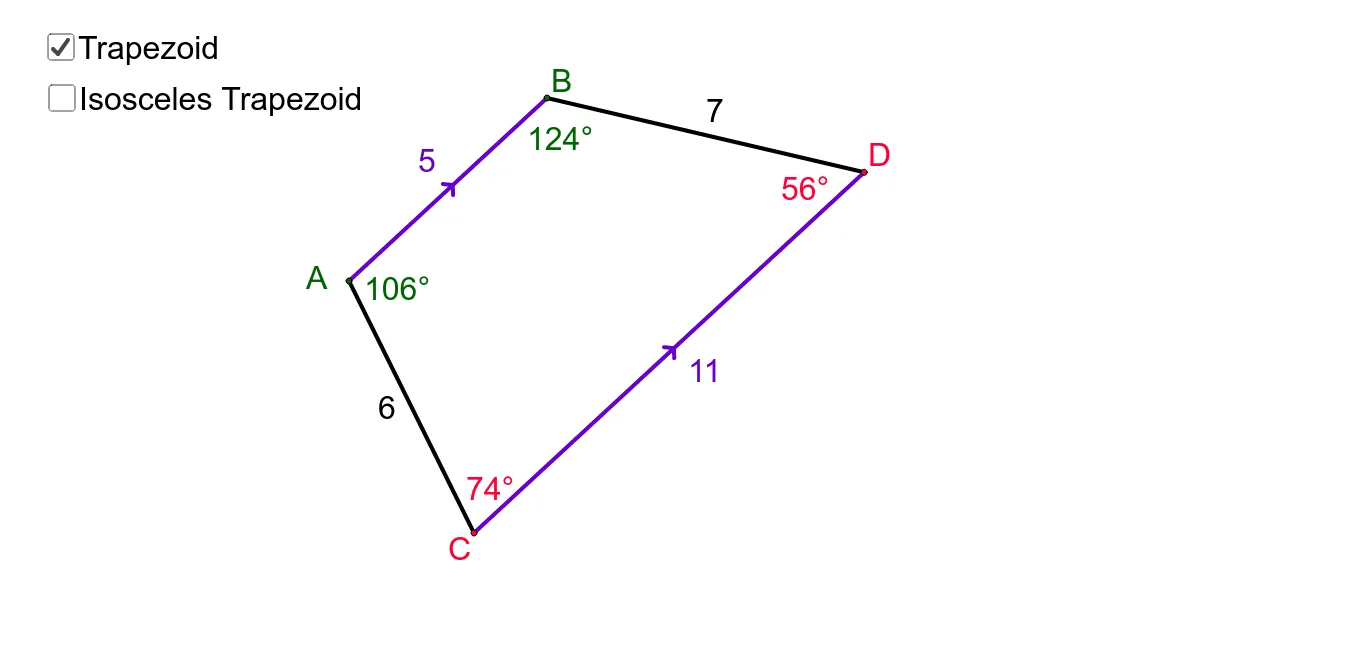
① This interactive GeoGebra example dynamically demonstrates the differences between a general trapezoid and an isosceles trapezoid, allowing students to observe how side lengths, base angles, and symmetry change as vertices are dragged. ② Core mathematical concepts include the definition of a trapezoid (one pair of parallel sides), properties of isosceles trapezoids (equal legs, equal base angles, congruent diagonals), and axial symmetry. ③ Construction details: The applet uses GeoGebra commands such as Segment, Line, Point, Angle, Circle, and Intersect to build vertices A, B, C, D, sides a, b, c, d, angles α, β, γ, δ, and auxiliary elements like circles and intersection points, enabling real-time measurement and comparison. ④ Suitable for middle school geometry lessons or high school review, this resource supports classroom demonstration, student-led exploration, and formative assessment of trapezoid classification.
GeoGebra Commands & Parameters
Segment(A, B) → aLine(C, a) → bPoint(b) → DSegment(A, B) → cSegment(C, D) → dSegment(A, C) → eSegment(B, D) → fAngle(C, A, B) → αAngle(A, B, D) → βAngle(B, D, C) → γAngle(D, C, A) → δCircle(B, Segment[A, C]) → gIntersect(g, d, 2) → ESegment(B, E) → hAngle(A, B, E) → εAngle(B, E, C) → ζSegment(C, E) → i
AI Drawing Prompt Reference
Create an interactive comparison between a general trapezoid and an isosceles trapezoid. Start by drawing two points as the endpoints of the bottom base and connect them. Through one endpoint, draw a line parallel to the bottom base and place another point on this line to form the top base, then connect the top endpoints. Draw the diagonals of the quadrilateral and measure all four interior angles. Create auxiliary segments related to the diagonals and measure additional angles. The shape can be dynamically changed by dragging the top vertex, allowing observation of how side lengths, base angles, and symmetry differ between a regular trapezoid and an isosceles trapezoid.
The prompt above was compiled from the original drawing commands and is for reference only.