
Exploring the Area of an Annulus via Concentric Circles
Loading the math board and drawing, please wait…
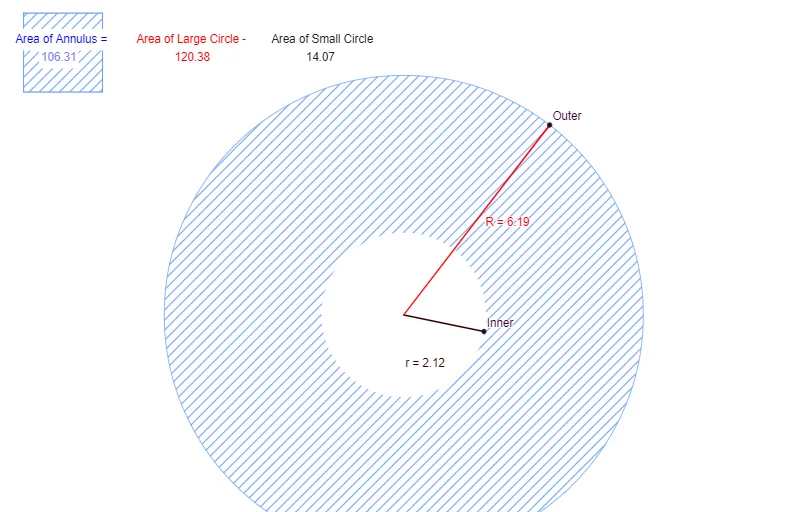
This GeoGebra example demonstrates how to explore the area of an annulus (ring-shaped region) by varying the inner and outer radii of two concentric circles. It focuses on core ideas such as circular geometry, the annulus area relationship A = π(R^2 − r^2), radius identification, and symmetry-based intuition for interpreting the region. Construction is driven by GeoGebra commands and objects from the provided construction summary: “Circle” creates the inner and outer circles (Inner/Small and Outer/Large) with radii r and R; “Point” and “Segment” define key reference points and connecting lines; “Polygon” forms the relevant region boundary(s) such as poly1; and “Area” is used to compute and display the area of the constructed annulus region. The activity is well suited for middle/high school geometry lessons, concept reinforcement, and interactive learning that connects visual area measurement to the standard formula.
GeoGebra Commands & Parameters
Circle(A, B) → cPoint(c) → CSegment(B, C) → aPoint(c) → DSegment(D, C) → bPoint(a) → InnerCircle(A, Inner) → dCircle(A, Inner) → SmallCircle(A, F) → ePoint(e) → GSegment(F, G) → fPoint(f) → OuterCircle(A, Outer) → LargeSegment(A, Inner) → rSegment(A, Outer) → RArea(Large) → gArea(Small) → hPolygon(E, H, 4) → poly1, i, j, k, l, I, J
AI Drawing Prompt Reference
Draw two concentric circles on the same plane with a shared center so that their radii define an annulus region. Choose the center point, construct a segment from the center to represent the inner radius, and another segment from the center to represent the outer radius, then draw the inner circle and outer circle using those distances. Use the boundaries formed by the outer circle together with the inner circle to outline the ring-shaped region, forming the relevant polygonal region for the annulus. Display area information for the constructed annulus, and also show the area associated with the inner and outer circle regions.
The prompt above was compiled from the original drawing commands and is for reference only.