
Trapezoid Construction and Transformations
Loading the math board and drawing, please wait…
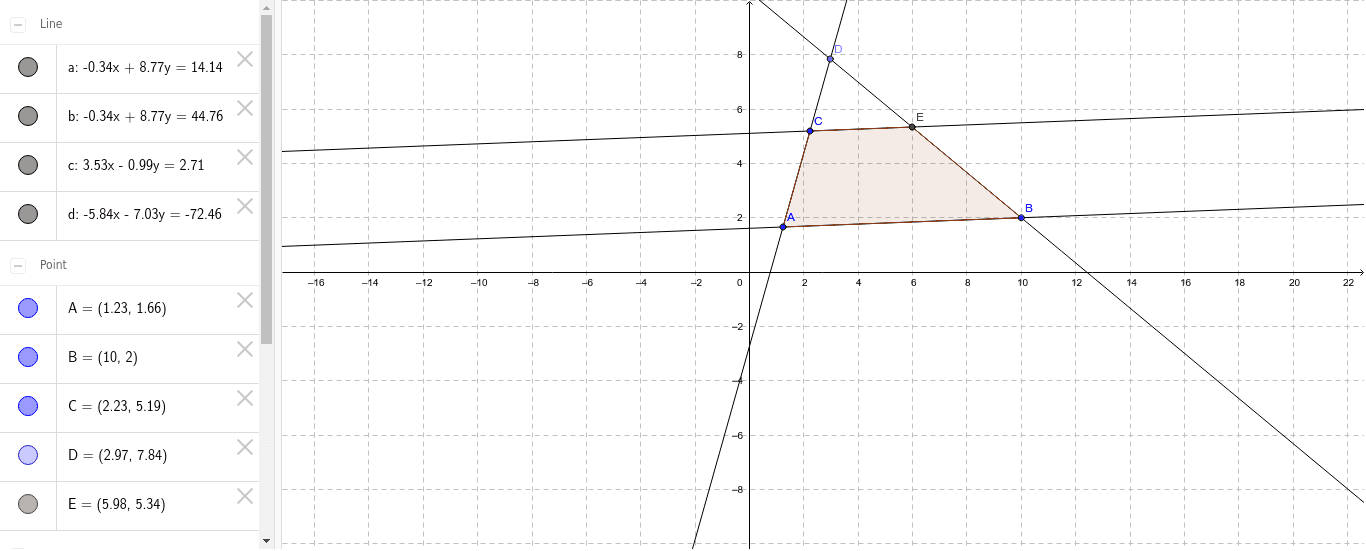
This example demonstrates the construction of a trapezoid and its geometric transformations. Key math concepts include trapezoid, parallelogram, perimeter, sine function, and slope difference. It uses commands like Line, Point, Intersect, and Polygon for construction, suitable for high school mathematics teaching to understand geometric transformations and calculations.
GeoGebra Commands & Parameters
Line(A, B) → aLine(C, a) → bLine(C, A) → cPoint(c) → DLine(B, D) → dIntersect(b, d) → EPolygon(C, E, B, A) → poly1, c_1, e, b_1, a_1
AI Drawing Prompt Reference
Draw a trapezoid by first creating two parallel line segments as the base and top, then connecting one endpoint of the top to a vertex of the base to form a non-parallel side. Next, draw a perpendicular line from the other endpoint of the base to the non-parallel side and connect the intersection point to the top vertex to complete the trapezoid, highlighting its perimeter and slope difference calculations.
The prompt above was compiled from the original drawing commands and is for reference only.