
Trapezoid Area: Interactive Exploration
Loading the math board and drawing, please wait…
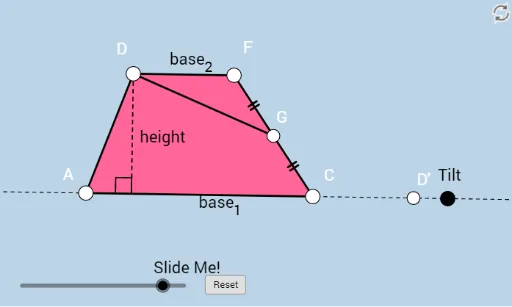
This example demonstrates interactive methods to calculate the area of a trapezoid. It involves core mathematical concepts such as the area formula of a trapezoid, function graphs, translation, centroid, triangles, and cosine theorem. Construction highlights include using GeoGebra commands and objects like Line, Ray, Point, Segment, Slope, PointIn, Midpoint, Dilate, Rotate, Polygon, OrthogonalLine, Intersect, Min, Circle, and Angle. Suitable for high school mathematics education to understand the derivation of the trapezoid area formula and geometric transformations.
GeoGebra Commands & Parameters
Line(A, B) → fRay(A, B) → gPoint(g) → CRay(A, C) → hSegment(A, C) → iSlope(i) → mPointIn(a) → DLine(D, i) → jPoint(j) → ERay(D, E) → kPoint(k) → FSegment(D, F) → lSegment(A, D) → nSegment(F, C) → pMidpoint(p) → GDilate(A, If[0 < c ≤ 1, 1 - c, 0], C) → A'Segment(A, A') → qDilate(C, If[1 < c ≤ 2, 2 - c, 0], G) → C'Segment(C, C') → rDilate(G, If[2 < c ≤ 3, 3 - c, 0], F) → G'Segment(G, G') → sRotate(C, If[3 < c ≤ 4, ((c - 3) * π), π], G) → C'_1Rotate(C', If[3 < c ≤ 4, ((c - 3) * π), π], G) → C''Segment(C'_1, C'') → r'Dilate(F, If[4 < c ≤ 5, 5 - c, 0], D) → F'Segment(F, F') → tDilate(D, If[5 < c ≤ 6, 6 - c, 0], A) → D'_6Segment(D, D'_6) → dDilate(D, If[6.5 < c ≤ 7.5, 7.5 - c, 0], G) → D'_1Polygon(A, C, G, D) → poly1, a_1, c_1, g_1, d_1Polygon(G, F, D) → poly2, d_2, g_2, f_1Segment(D, D'_1) → eRotate(G, If[8 < c ≤ 9, ((-(c - 8)) * π), π], G) → G'_1Rotate(F, If[8 < c ≤ 9, ((-(c - 8)) * π), π], G) → F'_1Rotate(D, If[8 < c ≤ 9, ((-(c - 8)) * π), π], G) → D'_2Polygon(G'_1, F'_1, D'_2) → poly2', d'_2, g'_1, f'_1Segment(F'_1, D'_2) → h_1Rotate(D, If[8 < c ≤ 9, ((-(c - 8)) * π), π], G) → D'_3Rotate(D'_1, If[8 < c ≤ 9, ((-(c - 8)) * π), π], G) → HSegment(D'_3, H) → e'Rotate(C'_1, If[8 < c ≤ 9, ((-(c - 8)) * π), π], G) → IRotate(C'', If[8 < c ≤ 9, ((-(c - 8)) * π), π], G) → C'''Segment(I, C''') → r''OrthogonalLine(D, q) → i_1Intersect(f, q) → JDilate(D, If[6 < c ≤ 7, 7 - c, 0], J) → D'_4Segment(D, D'_4) → j_1Min(t, q) → oCircle(J, (0.15 * o)) → e_1Intersect(e_1, i_1) → K, LIntersect(e_1, f) → M, NAngle(D, J, A) → αAngle(C, A, D) → βIntersect(i_1, f) → ODilate(D, If[6 < c ≤ 7, 7 - c, 0], O) → D'_5Segment(D, D'_5) → k_1Angle(A, O, D) → γPoint(f) → PPoint(f) → QCircle(C, t) → p_1Intersect(p_1, f, 2) → RRay(R, Q) → m_1Angle(F, C, A) → δIntersect(h_1, e') → D'_7Intersect(h_1, e') → D'
AI Drawing Prompt Reference
Draw a trapezoid to demonstrate its area calculation. Include the trapezoid's four sides, diagonals, midpoints, and centroid, along with auxiliary shapes generated by scaling and translation. Show how the area formula is derived using triangles and the cosine theorem, labeling key points and their relationships to form an interactive geometric illustration.
The prompt above was compiled from the original drawing commands and is for reference only.