
Trapezoid Area Calculation by Jeff Caldwell
Loading the math board and drawing, please wait…
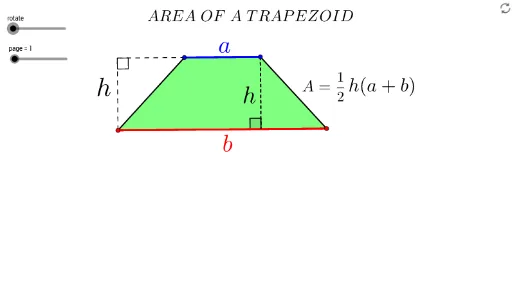
This example demonstrates how to dynamically calculate the area of a trapezoid. It involves core mathematical concepts like trapezoid definition, area formula, midpoint, rotation, orthogonal line, intersection calculation. Construction highlights include using commands like Segment, Line, Point, Polygon, Midpoint, Rotate, OrthogonalLine, Intersect, If to build the trapezoid and calculate height. Suitable for middle school and above students to learn geometric area calculation methods.
GeoGebra Commands & Parameters
Segment(A, B) → a_2Line(C, a_2) → b_2Point(b_2) → DPolygon(A, C, D, B) → P, a_1, a, d, bMidpoint(D, B) → ERotate(A, (-rotate), E) → A'Rotate(C, (-rotate), E) → C'Rotate(D, (-rotate), E) → D'Rotate(B, (-rotate), E) → B'Polygon(A', C', D', B') → P', a', c', d', b'Line(A, B) → eOrthogonalLine(D, e) → fIntersect(f, e) → FSegment(A, F) → cMidpoint(B', A') → GMidpoint(D', C') → HIf(rotate ≥ 0°, H) → IIf(rotate > 0°, H) → JIf(rotate > 0°, G) → KSegment(D, F) → h_1Angle(D, F, A) → βMidpoint(a_2) → LMidpoint(h_1) → MSegment(A, D) → gPolygon(A, C, D) → h_2, d_1, a_3, c_1Polygon(A, D, B) → poly2, b_1, a_4, d_2Line(D, C) → iOrthogonalLine(A, i) → jIntersect(i, j) → NSegment(N, C) → kSegment(A, N) → hIntersect(h, k) → OAngle(A, O, D) → α
AI Drawing Prompt Reference
Draw a trapezoid ABCD with A and B as the endpoints of the longer base and C and D as the endpoints of the shorter base. Rotate the trapezoid to create two new trapezoids A'B'C'D' and A''B''C''D''. Then, draw the perpendicular bisector of AB, intersecting AB at point F. Next, draw the perpendicular bisector of CD, intersecting CD at point N. Finally, draw line segment h through points A and N, intersecting line segment k at point O, and calculate the height and area of the trapezoid.
The prompt above was compiled from the original drawing commands and is for reference only.