
Perpendicular Lines by Jeff Caldwell
Loading the math board and drawing, please wait…
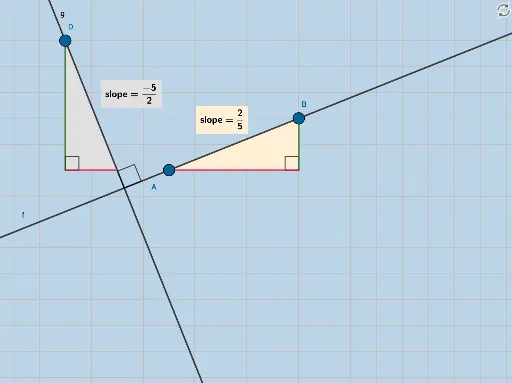
This example demonstrates perpendicular lines in the coordinate plane. It covers the basic properties and construction methods of perpendicular lines. Using GeoGebra commands such as Line, Intersect, and OrthogonalLine, one can visually understand the concept of perpendicular lines. Suitable for students at the junior high school level and above, focusing on coordinate geometry.
GeoGebra Commands & Parameters
Line(A, B) → fIntersect(g_2, h) → CPolygon(A, C, B) → poly1, b, a, cSegment(A, C) → iSegment(C, B) → jAngle(B, C, A) → αSlope(f) → d_1FractionText(d_1) → text1Denominator(d_1) → dNumerator(d_1) → nOrthogonalLine(D, f) → gIntersect(l, m) → FPolygon(D, F, E) → poly2, e, d_2, f_1Polygon(H, G, A) → poly3, a_1, h_1, g_1Segment(H, G) → pSegment(G, A) → qSegment(D, F) → rSegment(F, E) → sAngle(H, G, A) → βAngle(E, F, D) → γIntersect(f, g) → IAngle(B, I, D) → δFractionText(Slope[g]) → text2Distance(D, I) → distanceDIDistance(D, E) → distanceDEDistance(A, B) → distanceAB
AI Drawing Prompt Reference
Draw two perpendicular lines, first create line AB, then create a line CD perpendicular to AB, next draw triangle ABC, then draw a line EF perpendicular to AB, and finally draw triangle DEF, ensuring all segments and angles are perpendicular to each other.
The prompt above was compiled from the original drawing commands and is for reference only.