
Trapezoid Angle Bisector Demo
Loading the math board and drawing, please wait…
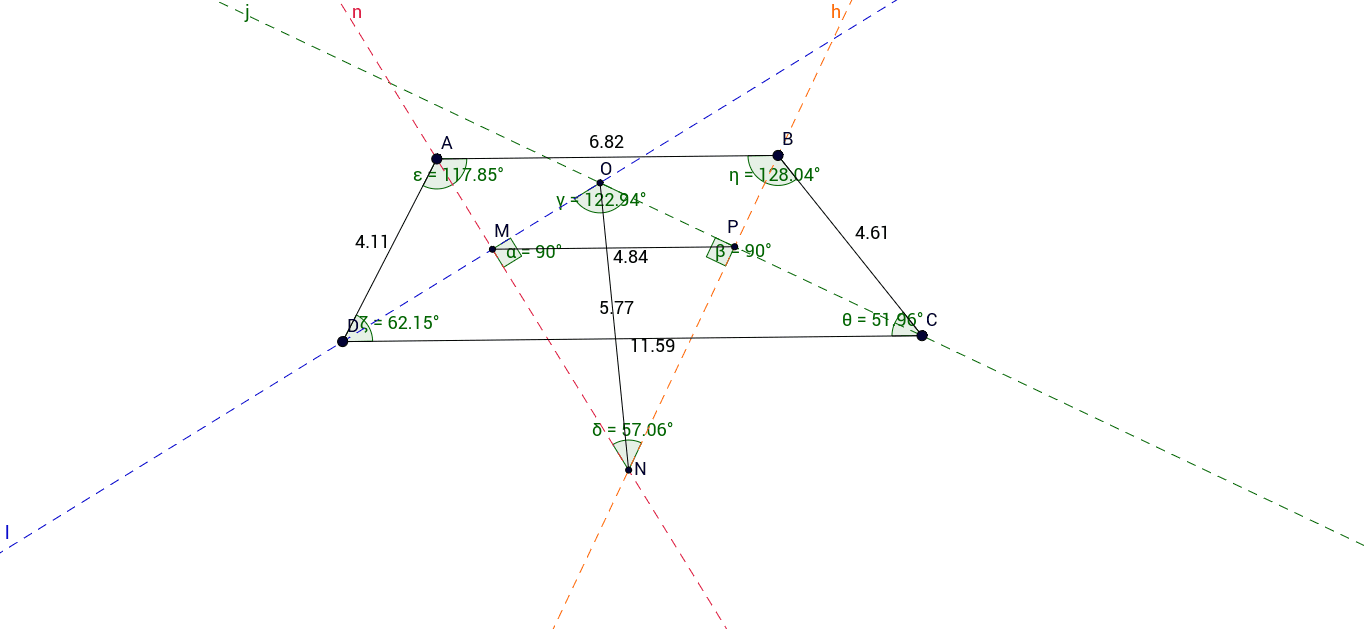
This example demonstrates the properties and construction of angle bisectors in a trapezoid, involving similarity transformations, incircles, and geometric constructions. Key GeoGebra commands used include Line, Point, Segment, AngularBisector, Intersect, and Angle. Suitable for high school geometry education and construction learning.
GeoGebra Commands & Parameters
Line(A_1, B_1) → aLine(C_1, a) → bPoint(a) → BPoint(a) → APoint(b) → DPoint(b) → CSegment(A, B) → cSegment(B, C) → dSegment(C, D) → eSegment(D, A) → fAngularBisector(c, d) → g, hAngularBisector(d, e) → i, jAngularBisector(e, f) → k, lAngularBisector(f, c) → m, nIntersect(j, l) → OIntersect(h, j) → PIntersect(h, n) → NIntersect(l, n) → MAngle(N, M, O) → αAngle(O, P, N) → βAngle(M, O, P) → γAngle(P, N, M) → δAngle(D, A, B) → εAngle(C, D, A) → ζAngle(A, B, C) → ηAngle(B, C, D) → θSegment(M, P) → pSegment(O, N) → q
AI Drawing Prompt Reference
Draw a trapezoid and demonstrate the properties of its angle bisectors. Start by sketching the four sides of the trapezoid, then construct the angle bisectors for each pair of adjacent sides and find their intersection points. Measure and label the angles of the quadrilateral formed by these intersection points, as well as the angles of the trapezoid itself. Finally, connect the intersection points with line segments to observe the relationships between the resulting shape and the trapezoid.
The prompt above was compiled from the original drawing commands and is for reference only.