
Trapezoid and Isosceles Trapezoid: Geometric Construction and Properties
Loading the math board and drawing, please wait…
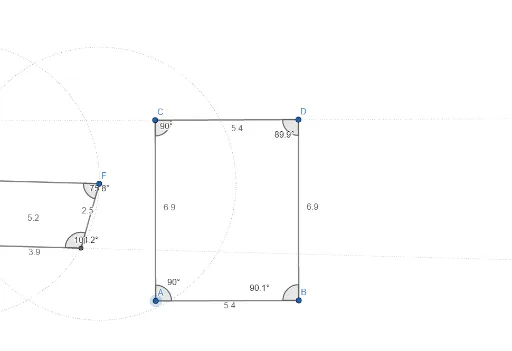
This GeoGebra example demonstrates the construction and properties of a trapezoid and an isosceles trapezoid. It visually explores quadrilateral classification, parallel line properties, symmetry, and angle relationships in these specific trapezoids. The construction uses GeoGebra commands such as Segment, Line, Point, Circle, Intersect, and Angle, involving multiple objects (points A through I, segments f, g, h, i, j, k, l, m, n, p, and angles α through θ) to precisely define the shapes and measure their angles. This resource is ideal for middle or high school geometry classes, helping students understand the definition of a trapezoid, the special characteristics of an isosceles trapezoid (equal base angles, equal diagonals), and fundamental geometric construction techniques.
GeoGebra Commands & Parameters
Segment(A, B) → fLine(C, f) → gSegment(A, C) → hPoint(g) → DSegment(B, D) → iSegment(C, D) → jSegment(E, F) → kLine(G, k) → lCircle(E, F) → cCircle(F, E) → dIntersect(d, l, 1) → HIntersect(c, l, 2) → ISegment(E, H) → mSegment(F, I) → nSegment(H, I) → pAngle(F, E, H) → αAngle(H, I, F) → βAngle(I, F, E) → γAngle(E, H, I) → δAngle(A, C, D) → εAngle(D, B, A) → ζAngle(C, D, B) → ηAngle(B, A, C) → θ
AI Drawing Prompt Reference
Draw a trapezoid and an isosceles trapezoid. First, construct a triangle, then draw a line through one vertex parallel to the opposite side, pick a point on that line, and connect it to the two base vertices to form a trapezoid. Next, draw a segment, construct a parallel line through one endpoint, draw two circles centered at the endpoints with radius equal to the segment, mark the intersections with the parallel line as the top base vertices, and connect all points to form an isosceles trapezoid. Finally, label all interior angles of both trapezoids with their measures.
The prompt above was compiled from the original drawing commands and is for reference only.