
Trapezium Rule Demonstration by pirsquared
Loading the math board and drawing, please wait…
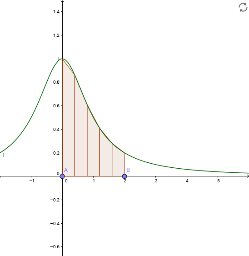
This example demonstrates the Trapezium Rule for numerical integration, showing how adjusting intervals and segments affects the approximation. Key math concepts include numerical integration, trapezoidal area, and function approximation. GeoGebra commands and objects used are Point, TrapezoidalSum, Sequence, Zip, Take, Insert, TableText, Textfield with objects f, A, B, a, b, n, Trap, h, xs, yends, list1, ymids, xmids, list2, more, text1, InputBox1, text2, fml. Suitable for high school students and teachers learning numerical integration and parameter adjustments.
GeoGebra Commands & Parameters
Point(xAxis) → APoint(xAxis) → BTrapezoidalSum(f, a, b, n) → TrapSequence(i, i, a, b, h) → xsZip(f(A), A, xs) → list1Take(list1, 2, Length[list1] - 1) → ymidsTake(xs, 2, Length[xs] - 1) → xmidsZip({A, " ", B}, A, xmids, B, ymids) → list2Insert(list2, {{"xs", "y_{ends}", "y_{mids}"}, {xs(1), yends(1), " "}, {xs(-1), yends(2), " "}}, 3) → moreTableText(Insert[{{"", "", ""}, {"\Sigma", Sum[yends], Sum[ymids]}}, more, -1], "|_c") → text1Textfield(f) → InputBox1