
Trapezium Diagonals Midpoints
Loading the math board and drawing, please wait…
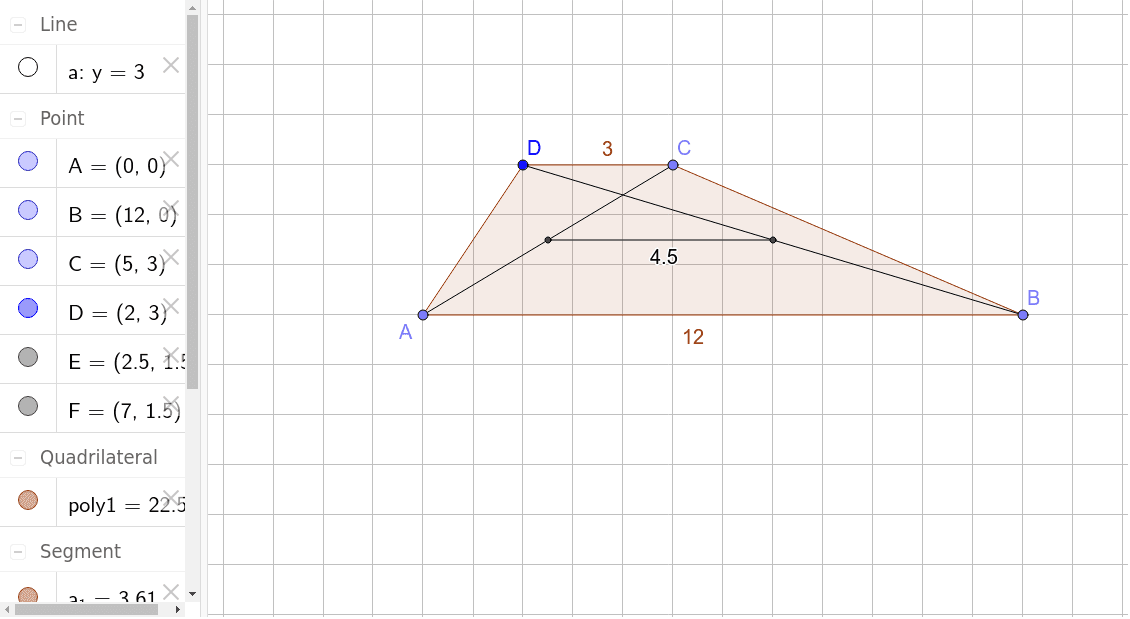
This GeoGebra example demonstrates the geometric property of the segment connecting the midpoints of the two diagonals in a trapezium (trapezoid). The core mathematical concepts involve the properties of trapezium diagonals, the midpoint theorem, and the proportionality of segments in parallel lines. Construction steps: use the Point command to create vertices A, B, C, D; Line to form sides; Polygon to construct the trapezium poly1; Segment to draw diagonals a_1 and c; Midpoint to locate E and F as the midpoints of the diagonals; finally Segment to connect E and F as line g. By dragging vertices, one can observe that the midpoint segment remains parallel to the bases and its length equals half the difference of the base lengths. Suitable for upper middle school or high school geometry classes, this interactive construction helps students intuitively grasp the generalized trapezium midline theorem and serves as a rich exploratory activity.
GeoGebra Commands & Parameters
Point(xAxis) → APoint(xAxis) → BLine(D, xAxis) → aPoint(a) → CPolygon(A, D, C, B) → poly1, a_1, c, d, bSegment(C, A) → eSegment(D, B) → fMidpoint(e) → EMidpoint(f) → FSegment(E, F) → g
AI Drawing Prompt Reference
Draw a trapezoid and connect the midpoints of its diagonals to observe that the segment connecting these midpoints is parallel to the bases and its length is half the difference of the base lengths. Start by plotting the four vertices of the trapezoid, connect the vertices to form the sides, then draw the diagonals and find their midpoints. Finally, connect the midpoints to show the parallelism and length relationship of the midsegment.
The prompt above was compiled from the original drawing commands and is for reference only.