
Trapezium Area Demonstration
Loading the math board and drawing, please wait…
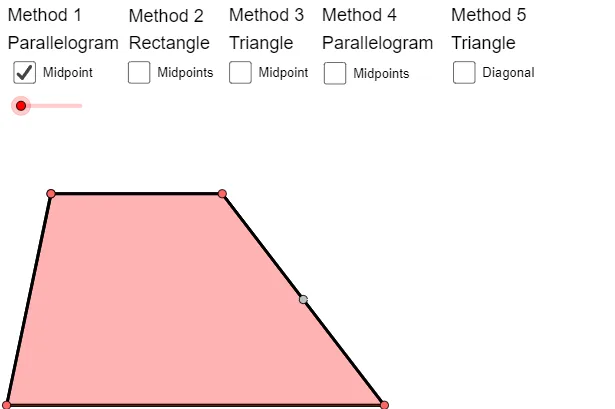
This example demonstrates the calculation of a trapezium's area. Key mathematical concepts include trapezoids, isosceles triangles, parallelograms, rectangles, and area calculation. It uses commands like rotation and intersection to construct a trapezium and visually demonstrate the area calculation process. Suitable for middle school and above students learning geometry and area calculation.
GeoGebra Commands & Parameters
OrthogonalLine(A, a) → bPoint(b) → BLine(C, b) → cPoint(c) → DSegment(C, A) → dSegment(B, D) → fSegment(A, B) → gSegment(C, D) → hMidpoint(f) → EPolygon(A, B, D, C) → poly1, a_1, b_1, d_1, c_1Rotate(A, Rotate, E) → A'Rotate(B, Rotate, E) → B'Rotate(D, Rotate, E) → D'Rotate(C, Rotate, E) → C'Polygon(A', B', D', C') → poly1', a', b', d', c'Midpoint(C, A) → FMidpoint(B, D) → GOrthogonalLine(F, h) → jOrthogonalLine(G, h) → kIntersect(k, h) → HIntersect(j, h) → IIntersect(k, g) → JIntersect(j, g) → KLine(C, D) → lLine(A, B) → mIntersect(j, l) → LIntersect(k, m) → MIntersect(j, m) → NIntersect(k, l) → OPoint(k) → PPolygon(P, O, D) → poly2, d_2, p, oPoint(j) → QPolygon(N, Q, A) → poly3, a_2, n, qPolygon(B, P, M) → poly4, m_1, b_2, p_1Polygon(Q, L, C) → poly5, c_2, q_1, l_1Rotate(P, α, G) → P'Rotate(O, α, G) → O'Rotate(D, α, G) → D'_1Polygon(P', O', D'_1) → poly2', d'_1, p', o'Rotate(N, α, F) → N'Rotate(Q, α, F) → Q'Rotate(A, α, F) → A'_1Polygon(N', Q', A'_1) → poly3', a'_1, n', q'Rotate(B, (-α), G) → B'_1Rotate(P, (-α), G) → P'_1Rotate(M, (-α), G) → M'Polygon(B'_1, P'_1, M') → poly4', m', b'_1, p'_1Rotate(Q, (-α), F) → Q'_1Rotate(L, (-α), F) → L'Rotate(C, (-α), F) → C'_1Polygon(Q'_1, L', C'_1) → poly5', c'_1, q'_1, l'If(x(A) > x(C), If[x(B) < x(D), Polygon[A, B, G, O, L, F], Polygon[A, M, G, D, L, F]], If[x(B) < x(D), Polygon[N, B, G, O, C, F], Polygon[N, M, G, D, C, F]]) → polyHexIf(x(A) > x(C), If[x(B) < x(D), Polygon[A, B, G, O, L, F], Polygon[A, M, G, D, L, F]], If[x(B) < x(D), Polygon[N, B, G, O, C, F], Polygon[N, M, G, D, C, F]]) → polyHexBorderMidpoint(B, D) → RLine(A, R) → sLine(C, D) → tIntersect(t, s) → SPolygon(A, B, R) → poly6, r_1, a_3, b_3Rotate(A, (-β), R) → A'_2Rotate(B, (-β), R) → B'_2Rotate(R, (-β), R) → R'Polygon(A'_2, B'_2, R') → poly6', r', a'_2, b'_2Polygon(A, C, D, R) → poly7, a_4, c_3, d_3, r_2Polygon(A, R, D, C) → poly8, a_5, r_3, d_4, c_4Polygon(A'_2, B'_2, R) → poly9, r_4, a'_3, b'_3Segment(F, G) → e_1Polygon(F, G, B, A) → poly10, f_1, g_1, b_4, a_6Rotate(F, (-γ), G) → F'Rotate(G, (-γ), G) → G'Rotate(B, (-γ), G) → B'_3Rotate(A, (-γ), G) → A'_3Polygon(F', G', B'_3, A'_3) → poly10', f', g', b'_4, a'_4Polygon(C, F, G, D) → poly11, c_5, f_2, g_2, d_5Midpoint(Bt, Dt) → TPolygon(A, D, B) → poly12, b_5, a_7, d_6Rotate(A, (-δ), T) → A'_4Rotate(D, (-δ), T) → D'_2Rotate(B, (-δ), T) → B'_4Polygon(A'_4, D'_2, B'_4) → poly12', b'_5, a'_5, d'_2Segment(A, D) → h_1Segment(A, D) → i_1Polygon(A, C, D) → poly13, d_7, a_8, c_6Segment(Ah, Dh) → j_1OrthogonalLine(Ah, c) → k_1OrthogonalLine(Dh, c) → n_1Point(k_1) → VPoint(n_1) → WOrthogonalLine(V, c) → t_1OrthogonalLine(W, c) → e_2Intersect(t_1, c) → ZIntersect(e_2, c) → A_1Segment(A_1, Z) → s_1
AI Drawing Prompt Reference
Draw a trapezoid and demonstrate its area calculation. Construct the trapezoid first, then find midpoints and draw auxiliary lines using rotations and intersections. Next, create parallelograms and triangles through rotations and intersections, and calculate the area. Finally, show the rotated shapes and intersections to complete the area demonstration.
The prompt above was compiled from the original drawing commands and is for reference only.