
Trapezium Area Demonstration by mister mac
Loading the math board and drawing, please wait…
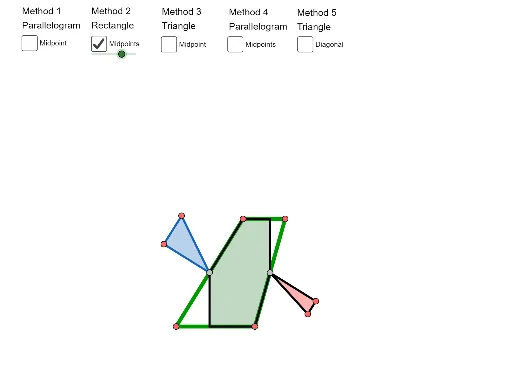
This example demonstrates the calculation of trapezium area. Key mathematical concepts include trapezoid, median value, rectangle, and linear functions. By constructing a trapezium, median, rectangle, and linear function, the process of calculating trapezium area is illustrated. GeoGebra commands such as OrthogonalLine, Point, Line, Segment, Midpoint, Polygon, Rotate, Intersect, and If are used. Suitable for students in middle school and above learning geometry and function-related knowledge.
GeoGebra Commands & Parameters
OrthogonalLine(A, a) → bPoint(b) → BLine(C, b) → cPoint(c) → DSegment(C, A) → dSegment(B, D) → fSegment(A, B) → gSegment(C, D) → hMidpoint(f) → EPolygon(A, B, D, C) → poly1, a_1, b_1, d_1, c_1Rotate(A, Rotate, E) → A'Rotate(B, Rotate, E) → B'Rotate(D, Rotate, E) → D'Rotate(C, Rotate, E) → C'Polygon(A', B', D', C') → poly1', a', b', d', c'Midpoint(C, A) → FMidpoint(B, D) → GOrthogonalLine(F, h) → jOrthogonalLine(G, h) → kIntersect(k, h) → HIntersect(j, h) → IIntersect(k, g) → JIntersect(j, g) → KLine(C, D) → lLine(A, B) → mIntersect(j, l) → LIntersect(k, m) → MIntersect(j, m) → NIntersect(k, l) → OPoint(k) → PPolygon(P, O, D) → poly2, d_2, p, oPoint(j) → QPolygon(N, Q, A) → poly3, a_2, n, qPolygon(B, P, M) → poly4, m_1, b_2, p_1Polygon(Q, L, C) → poly5, c_2, q_1, l_1Rotate(P, α, G) → P'Rotate(O, α, G) → O'Rotate(D, α, G) → D'_1Polygon(P', O', D'_1) → poly2', d'_1, p', o'Rotate(N, α, F) → N'Rotate(Q, α, F) → Q'Rotate(A, α, F) → A'_1Polygon(N', Q', A'_1) → poly3', a'_1, n', q'Rotate(B, (-α), G) → B'_1Rotate(P, (-α), G) → P'_1Rotate(M, (-α), G) → M'Polygon(B'_1, P'_1, M') → poly4', m', b'_1, p'_1Rotate(Q, (-α), F) → Q'_1Rotate(L, (-α), F) → L'Rotate(C, (-α), F) → C'_1Polygon(Q'_1, L', C'_1) → poly5', c'_1, q'_1, l'If(x(A) > x(C), If[x(B) < x(D), Polygon[A, B, G, O, L, F], Polygon[A, M, G, D, L, F]], If[x(B) < x(D), Polygon[N, B, G, O, C, F], Polygon[N, M, G, D, C, F]]) → polyHexIf(x(A) > x(C), If[x(B) < x(D), Polygon[A, B, G, O, L, F], Polygon[A, M, G, D, L, F]], If[x(B) < x(D), Polygon[N, B, G, O, C, F], Polygon[N, M, G, D, C, F]]) → polyHexBorderMidpoint(B, D) → RLine(A, R) → sLine(C, D) → tIntersect(t, s) → SPolygon(A, B, R) → poly6, r_1, a_3, b_3Rotate(A, (-β), R) → A'_2Rotate(B, (-β), R) → B'_2Rotate(R, (-β), R) → R'Polygon(A'_2, B'_2, R') → poly6', r', a'_2, b'_2Polygon(A, C, D, R) → poly7, a_4, c_3, d_3, r_2Polygon(A, R, D, C) → poly8, a_5, r_3, d_4, c_4Polygon(A'_2, B'_2, R) → poly9, r_4, a'_3, b'_3Segment(F, G) → e_1Polygon(F, G, B, A) → poly10, f_1, g_1, b_4, a_6Rotate(F, (-γ), G) → F'Rotate(G, (-γ), G) → G'Rotate(B, (-γ), G) → B'_3Rotate(A, (-γ), G) → A'_3Polygon(F', G', B'_3, A'_3) → poly10', f', g', b'_4, a'_4Polygon(C, F, G, D) → poly11, c_5, f_2, g_2, d_5Midpoint(Bt, Dt) → TPolygon(A, D, B) → poly12, b_5, a_7, d_6Rotate(A, (-δ), T) → A'_4Rotate(D, (-δ), T) → D'_2Rotate(B, (-δ), T) → B'_4Polygon(A'_4, D'_2, B'_4) → poly12', b'_5, a'_5, d'_2Segment(A, D) → h_1Segment(A, D) → i_1Polygon(A, C, D) → poly13, d_7, a_8, c_6Segment(Ah, Dh) → j_1OrthogonalLine(Ah, c) → k_1OrthogonalLine(Dh, c) → n_1Point(k_1) → VPoint(n_1) → WOrthogonalLine(V, c) → t_1OrthogonalLine(W, c) → e_2Intersect(t_1, c) → ZIntersect(e_2, c) → A_1Segment(A_1, Z) → s_1
AI Drawing Prompt Reference
Draw a trapezoid and demonstrate its area calculation. Start by constructing the trapezoid and its median line, then create a rectangle using the median. Next, use rotations and midpoints to form similar smaller trapezoids and rectangles, labeling key points and median lines. Finally, rotate the similar shapes to illustrate the geometric meaning of the area formula.
The prompt above was compiled from the original drawing commands and is for reference only.