
Trapezium Area Calculation by Pratima Nayak
Loading the math board and drawing, please wait…
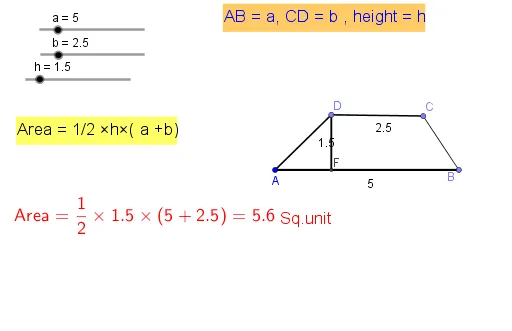
This example demonstrates how to dynamically calculate the area of a trapezium using GeoGebra. It involves core mathematical concepts such as the area formula of a trapezium, coordinate geometry, and geometric transformations. The construction utilizes GeoGebra commands and objects like Point, Segment, Rotate, Angle, Line, OrthogonalLine, Intersect, and Simplify. Suitable for middle school students and math enthusiasts for learning and validating geometric calculations.
GeoGebra Commands & Parameters
Point(Circle[A, a]) → BSegment(A, B) → fPoint(Circle[B, h]) → C_1Segment(B, C_1) → gRotate(C_1, 90°, B) → C'Angle(C_1, B, C') → αSegment(C', B) → iLine(C', f) → jPoint(j) → DPoint(Circle[D, b]) → CSegment(D, C) → kSegment(A, D) → lSegment(C, B) → mOrthogonalLine(D, f) → nIntersect(f, n) → FSegment(D, F) → pSimplify(((0.5 * h) * (a + b))) → q