
Trapezium Area and Perimeter Quiz
Loading the math board and drawing, please wait…
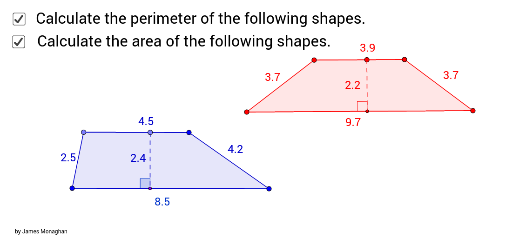
This example demonstrates the calculation of trapezium area and perimeter. It involves core mathematical concepts such as trapezoid geometry, area formulas, perimeter computation, and coordinate geometry. Construction highlights include using commands like Segment, Line, Point, Polygon, OrthogonalLine, Intersect, and Angle in GeoGebra to build the trapezium and auxiliary lines. Suitable for middle school and above students for learning and practicing geometric calculations.
GeoGebra Commands & Parameters
Segment(A_2, B_2) → f_2Line(C_2, f_2) → g_2Point(g_2) → D_2Segment(D_2, C_2) → h_2Polygon(D_2, A_2, B_2, C_2) → poly1_2, d_2, a_2, b_2, c_2Point(h_2) → E_2OrthogonalLine(E_2, f_2) → i_2Intersect(i_2, f_2) → F_2Line(A_2, B_2) → k_2OrthogonalLine(E_2, k_2) → l_2Intersect(k_2, l_2) → G_2Segment(E_2, G_2) → j_2Segment(A_3, B_3) → f_3Line(C_3, f_3) → g_3Point(g_3) → D_3Segment(D_3, C_3) → h_3Polygon(D_3, A_3, B_3, C_3) → poly1_3, d_3, a_3, b_3, c_3Point(h_3) → E_3OrthogonalLine(E_3, f_3) → i_3Intersect(i_3, f_3) → F_3Line(A_3, B_3) → k_3OrthogonalLine(E_3, k_3) → l_3Intersect(k_3, l_3) → G_3Segment(E_3, G_3) → j_3Point(k_3) → AAngle(E_3, G_3, A) → αPoint(k_2) → CAngle(E_2, F_2, C) → γ
AI Drawing Prompt Reference
Draw a trapezoid and calculate its area and perimeter. First, construct the four sides of the trapezoid. Then, find the midpoints of the two non-parallel sides and connect them. Next, draw perpendicular lines from these midpoints to the bases of the trapezoid to locate the feet of the perpendiculars. Finally, measure and label the height, top and bottom bases, and the perimeter of the trapezoid, along with the angles.
The prompt above was compiled from the original drawing commands and is for reference only.