
Percentage Spider + Inverse
Loading the math board and drawing, please wait…
In collections
Lesson Starters
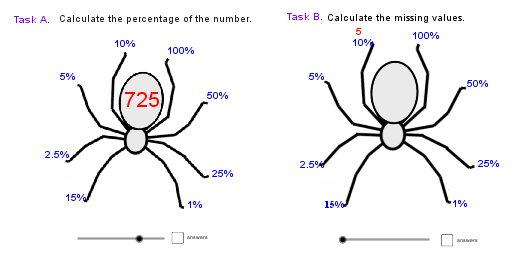
This example demonstrates how to create a percentage spider chart using GeoGebra, integrating inverse functions for visual analysis. It involves core concepts like quadratic functions, cosine, ellipses, orthocenters, and spheres. Construction uses commands like If and Random, along with objects A, B, a, etc., to visualize parameter changes via sliders and animations. Suitable for high school and above mathematics education, focusing on function graphs, geometric transformations, and data analysis.
GeoGebra Commands & Parameters
If(c ≟ true, 100 + percentage10, percentage10) → q10If(c ≟ true, 100 + percentage1, percentage1) → q1If(c ≟ true, 100 + percentage25, percentage25) → q25If(c ≟ true, 100 + percentage50, percentage50) → q50If(c ≟ true, 100 + percentage100, percentage100) → q100If(c ≟ true, 100 + percentage05, percentage05) → q05If(c ≟ true, 100 + percentage025, percentage025) → q025If(c ≟ true, 100 + percentage15, percentage15) → q15Random(1, 8) → eRandom(1, 8) → RandomInverse
AI Drawing Prompt Reference
Create a percentage spider chart with five key points at 10%, 1%, 25%, 50%, and 100%. Adjust these points using conditional statements. Generate two random numbers with one used for visualizing inverse functions. The chart includes multiple sliders and animations to demonstrate function graphs, trigonometry, coordinate geometry, and geometric transformations.
The prompt above was compiled from the original drawing commands and is for reference only.