
Transporting an Angle: Constructing a Congruent Angle by Geometric Steps
Loading the math board and drawing, please wait…
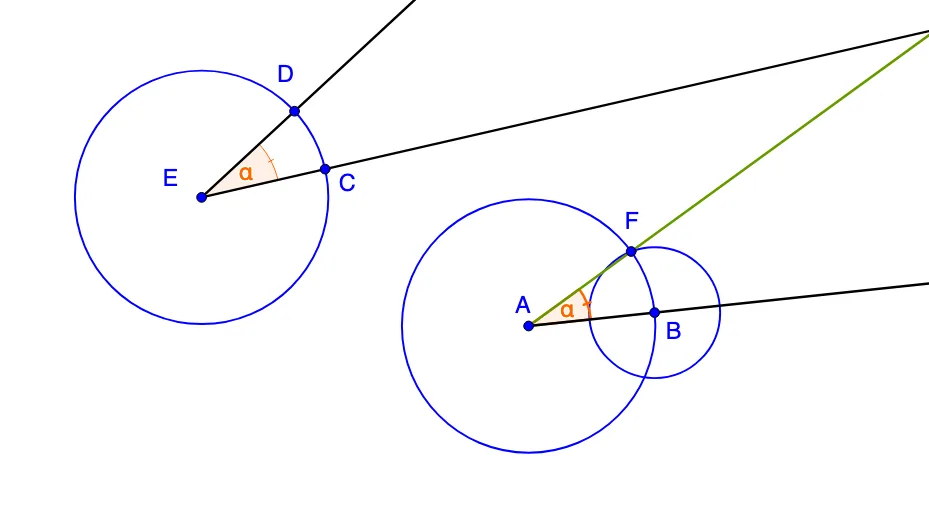
This example demonstrates how to “transport” (recreate) a given angle on the plane: it constructs a new angle with the same opening measure while placing it at a different location. The key mathematical ideas are angle congruence (preserving the angle), the use of circles and intersection points to transfer geometric constraints, and systematic straightedge-and-compass-style construction logic. Construction highlights in GeoGebra: use Ray to define the angle’s sides as rays; create and manage the angle using Angle; place defining points with Point; draw circles with Circle to enforce equal-radius constraints; and use Intersect to compute the relevant intersection points that determine the translated ray directions. The model uses multiple labeled points and angle markers (such as α and β) together with constructed circles and intersection objects (e.g., A, B, C, D and intermediate points) to obtain the congruent angle. Suitable for middle to high school geometry lessons, geometry-construction practice, and early proof-oriented activities.
GeoGebra Commands & Parameters
Ray(E, B_1) → aRay(E, C_1) → bRay(A, E_1) → cAngle(a, b) → αPoint(a) → CCircle(E, C) → dIntersect(d, b, 1) → DCircle(A, Radius[d]) → eIntersect(e, c, 1) → BCircle(B, Segment[C, D]) → fIntersect(e, f, 1) → FRay(A, F) → gAngle(B, A, F) → β
AI Drawing Prompt Reference
On a plane, start by drawing an angle α with its two sides as rays originating from the same point E. Then construct a congruent angle β at a different location: draw a circle centered at E with a radius chosen to match the distance to the defining point C of the original angle, and intersect this circle with the ray b to obtain a point D. Next draw a circle centered at A with the same radius and intersect it with the ray c to get a point B. Draw another circle centered at B with radius equal to the segment determined by C and D, and intersect it with the earlier circle through B to obtain point F. Finally draw the ray AF and mark β as the angle ∠BAF.
The prompt above was compiled from the original drawing commands and is for reference only.