
Translations with Vectors: Explore Coordinate Shifts and Inverse Translations
Loading the math board and drawing, please wait…
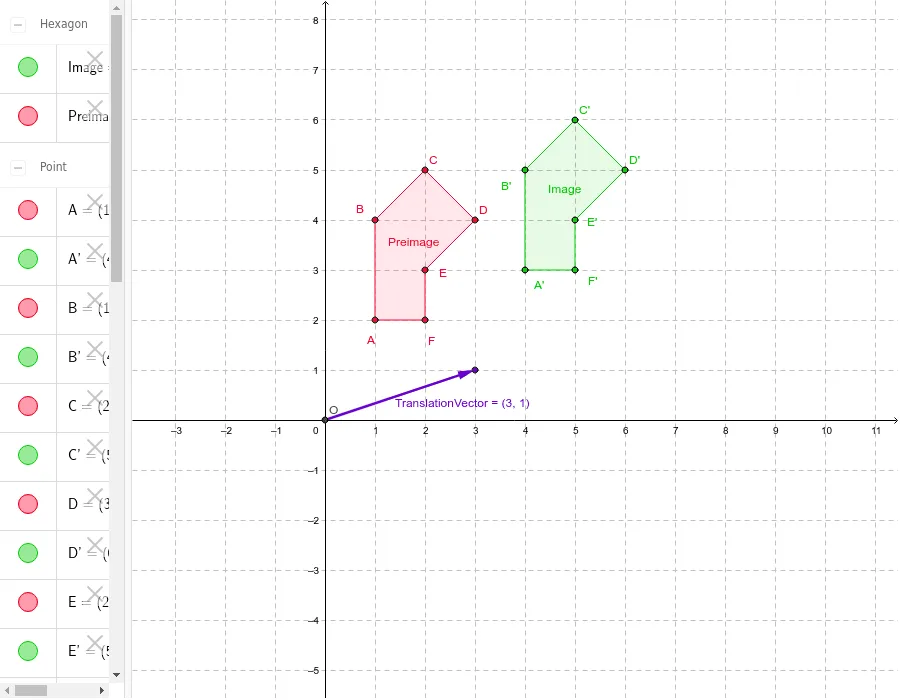
This GeoGebra example dynamically demonstrates the translation of a plane figure by a given vector, showing how the translation vector affects the coordinates of every point. Core mathematical concepts include vectors, translation transformations, identity translation (zero vector), and inverse translation (opposite vector). Construction highlights: using Polygon to create the preimage polygon, Vector to define the translation vector, Translate to generate the image, and an additional InverseTranslationVector to illustrate reversibility. Objects include points A-F and their images A'-F', along with sides a-f and corresponding image sides a'-f'. Suitable for middle school to high school students learning plane vectors and geometric transformations, and useful for teachers demonstrating coordinate shift rules and vector properties in class.
GeoGebra Commands & Parameters
Polygon(A, B, C, D, E, F) → Preimage, a, b, c, d, e, fIntersect(xAxis, yAxis) → OVector(O, H) → TranslationVectorTranslate(A, TranslationVector) → A'Translate(B, TranslationVector) → B'Translate(C, TranslationVector) → C'Translate(D, TranslationVector) → D'Translate(E, TranslationVector) → E'Translate(F, TranslationVector) → F'Polygon(A', B', C', D', E', F') → Image, a', b', c', d', e', f'Vector(F', F) → InverseTranslationVector
AI Drawing Prompt Reference
Draw a hexagon ABCDEF and translate it using a vector to create a new hexagon A'B'C'D'E'F'. First, create hexagon ABCDEF, then define the origin O and use vector OH as the translation vector to translate each vertex to generate new vertices A' to F'. Finally, use these new vertices to create the new hexagon A'B'C'D'E'F'. Also, draw vector F'F as the inverse translation vector to show the relationship between translation and inverse translation.
The prompt above was compiled from the original drawing commands and is for reference only.