
Translation Demonstration by Stacy Blemaster
Loading the math board and drawing, please wait…
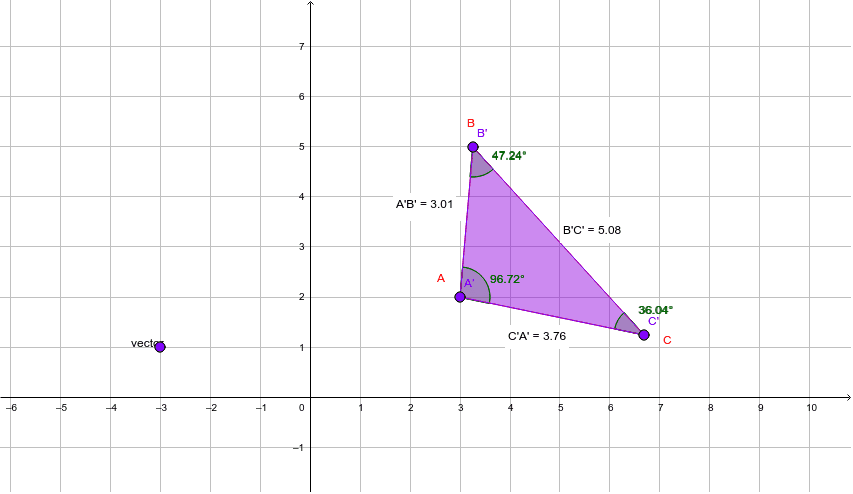
This example demonstrates the geometric process of polygon translation. It involves core mathematical concepts such as vectors, angles, distances, and geometric transformations. Construction highlights include using GeoGebra commands and objects like Polygon, Vector, Translate, Angle, and Distance to build and illustrate the translation. Suitable for high school mathematics teaching to understand vector transformations and geometric constructions.
GeoGebra Commands & Parameters
Polygon(A, B, C) → poly1, c, a, bVector(D, E) → vectorTranslate(A, vector) → A'Translate(B, vector) → B'Translate(C, vector) → C'Polygon(A', B', C') → poly1', c', a', b'Angle(C, A, B) → αAngle(A, B, C) → βAngle(B, C, A) → γAngle(C', A', B') → δAngle(A', B', C') → εAngle(B', C', A') → ζDistance(A, B) → distanceABDistance(B, C) → distanceBCDistance(C, A) → distanceCADistance(A', B') → distanceA'B'Distance(B', C') → distanceB'C'Distance(C', A') → distanceC'A'
AI Drawing Prompt Reference
Draw a triangle, then create a vector defined by two points. Translate each vertex of the triangle by this vector to form a second triangle. Use dashed lines or different colors to distinguish the original and translated triangles, and label corresponding vertices. Also, measure and display the three interior angles and side lengths for both triangles to show that translation preserves shape and size.
The prompt above was compiled from the original drawing commands and is for reference only.