
Translation Demo: Polygon Shifted by Vector
Loading the math board and drawing, please wait…
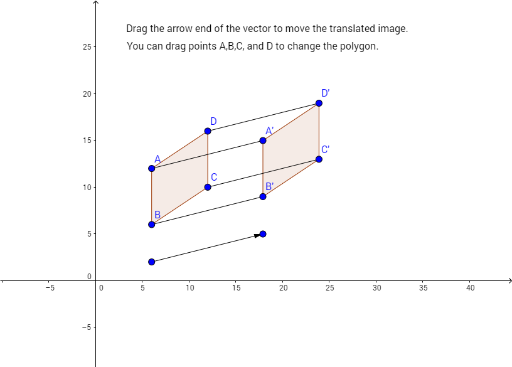
① This example demonstrates how a polygon is translated using a vector, showing the correspondence between the original and translated figures. ② Core mathematical concepts include translation transformation, vector representation, polygon geometry, and the translation formula in coordinate geometry. ③ Construction highlights: Polygon creates poly1; Vector defines the translation vector; Translate moves vertices A, B, C, D and edges a, b, c, d to produce A', B', C', D' and poly1'; Segment draws connecting segments; text1 and text2 provide labels. ④ Suitable for middle‑school geometry transformation lessons, high‑school analytic geometry review, and beginners practicing GeoGebra transformation commands.
GeoGebra Commands & Parameters
Polygon(A, B, C, D) → poly1, a, b, c, dVector(E, F) → eTranslate(A, e) → A'Translate(B, e) → B'Translate(C, e) → C'Translate(D, e) → D'Polygon(A', B', C', D') → poly1', a', b', c', d'Segment(A, A') → fSegment(D, D') → gSegment(C, C') → hSegment(B, B') → i
AI Drawing Prompt Reference
Draw a quadrilateral and then translate it using a vector to show the correspondence between the original and translated figures. Connect the vertices of the original quadrilateral with the corresponding vertices of the translated quadrilateral with line segments, and label both the original and translated shapes.
The prompt above was compiled from the original drawing commands and is for reference only.