
Translation Along a Vector
Loading the math board and drawing, please wait…
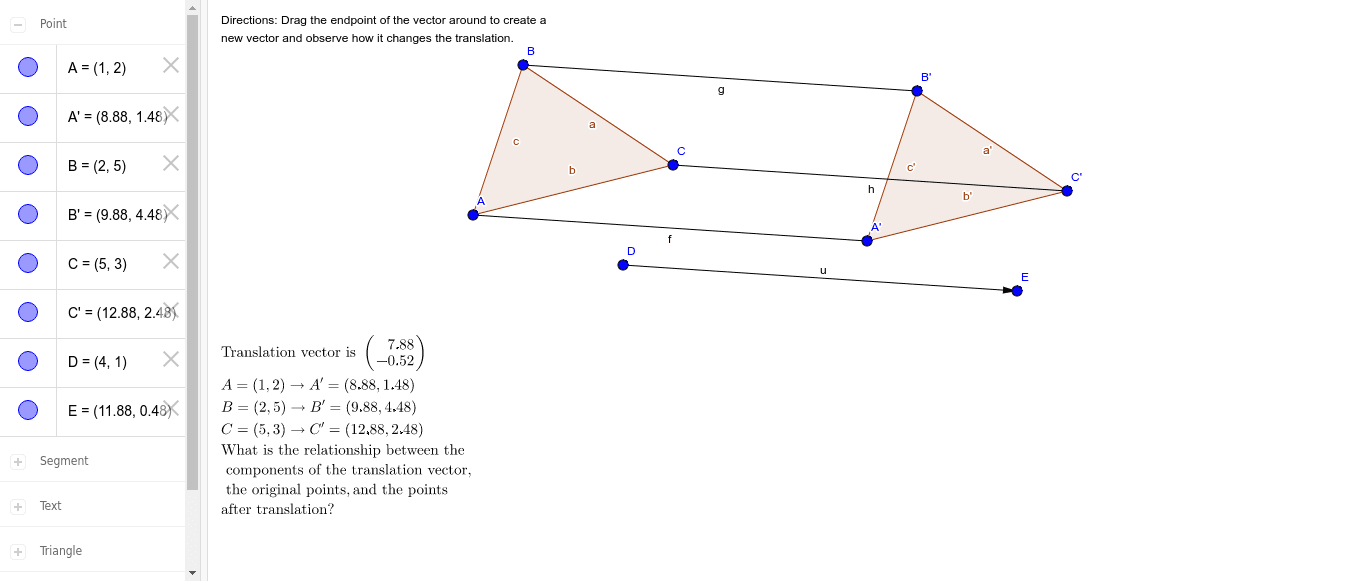
① This example demonstrates the translation of a quadrilateral (along with its internal segments) along a given vector, visually showing the positional relationship between the original and translated figures. ② Core mathematical concepts include translation transformation in plane geometry, vectors, and their action on the coordinate plane, involving polygons, segments, and vectors. ③ Construction highlights: using GeoGebra commands Polygon to create quadrilateral poly1, Vector to define translation vector u, and Translate to move the polygon, segments, and points, generating corresponding images A', B', C', poly1', etc., while retaining both original and translated figures with text labels. ④ Suitable for middle school geometry teaching or introductory high school vector lessons, helping students understand the geometric meaning of translation and how vector direction and magnitude affect the result, also useful as dynamic demonstration material.
GeoGebra Commands & Parameters
Polygon(A, B, C) → poly1, c, a, bVector(D, E) → uTranslate(A, u) → A'Translate(B, u) → B'Translate(C, u) → C'Polygon(A', B', C') → poly1', c', a', b'Segment(A, A') → fSegment(B, B') → gSegment(C, C') → h
AI Drawing Prompt Reference
Draw a triangle and a given translation vector. Translate each vertex of the triangle along the vector to obtain a new triangle. Connect each original vertex to its corresponding translated vertex with a segment, showing three parallel and equal-length segments that indicate the direction and distance of translation. Keep both the original and translated triangles along with the connecting segments, and label all points to clearly illustrate the positional relationship before and after the translation.
The prompt above was compiled from the original drawing commands and is for reference only.