
Translation Activity: Polygon and Vector Transformation
Loading the math board and drawing, please wait…
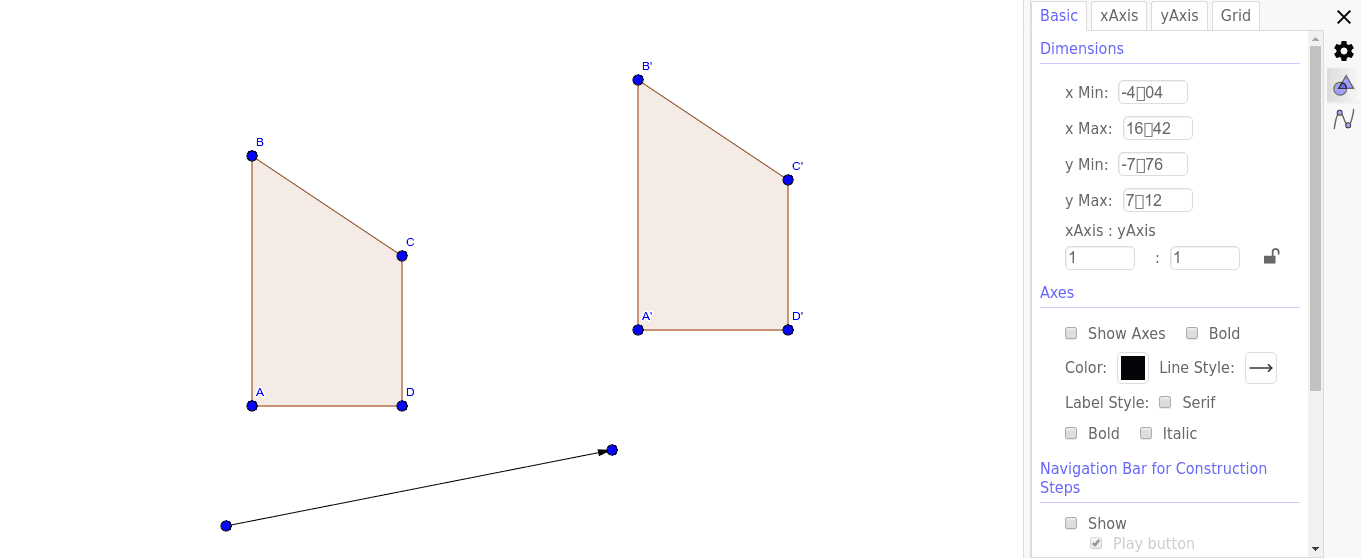
① This example demonstrates how to translate a polygon using a vector and observe the positional relationship between the original and its image. ② The core mathematical concept is translation in plane geometry, involving vectors, polygons, corresponding points and sides, and the property that translation preserves shape and size. ③ Construction: using GeoGebra commands Polygon to create poly1, Vector to define translation vector u, and Translate to move the polygon and its edges/vertices (A, B, C, D, etc.) along u, generating image poly1' and corresponding points A', B', C', D', while keeping the original for comparison. ④ Suitable for middle school geometry or introductory high school vector lessons, to intuitively understand the definition of translation, vector representation, and transformation properties, and as an interactive exploration activity.
GeoGebra Commands & Parameters
Polygon(A, B, C, D) → poly1, a, b, c, dVector(E, F) → uTranslate(A, u) → A'Translate(B, u) → B'Translate(C, u) → C'Translate(D, u) → D'Polygon(A', B', C', D') → poly1', a', b', c', d'