
Translating Lines to Find Equations
Loading the math board and drawing, please wait…
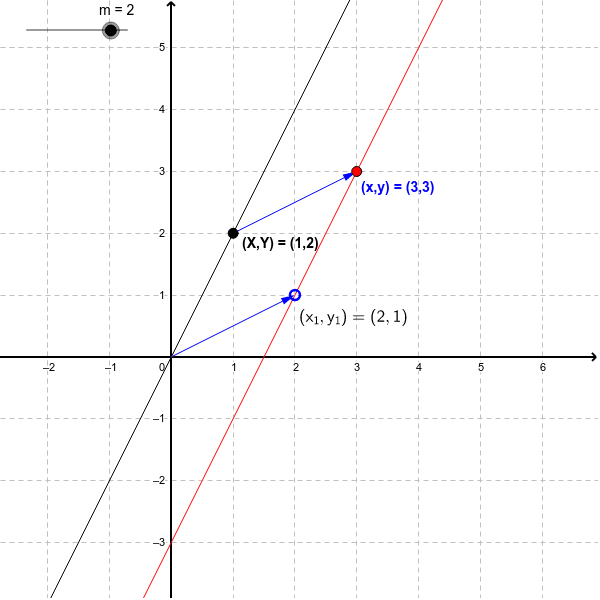
This example demonstrates how to find the equation of a new straight line obtained by translating the line [math]y=mx[/math] to the point [math](x_1,y_1)[/math], resulting in [math]y-y_1 = m(x-x_1)[/math]. Key math concepts include line equations, translation transformations, and coordinate geometry. The construction uses GeoGebra commands like TableText, Corner, Distance, Text, Point, Intersect, Vector and objects such as Xt0, corner1, corner3, corner2, corner4, screenDim, distX, distY, unitX, unitY, O, text3, m, a, b, B, A, C, u, v, text1, text2. Suitable for high school students learning coordinate geometry and transformations.
GeoGebra Commands & Parameters
TableText({{"0"}, {"\ \ \ \ \ \ \ \ \ \ \ \ \ \ \ \ "}}, "hc") → Xt0Corner(1) → corner1Corner(3) → corner3Corner(2) → corner2Corner(4) → corner4Corner(5) → screenDimDistance(corner1, corner2) → distXDistance(corner1, corner4) → distYText("$(x_1,y_1)=(" + (x(O)) + "," + (y(O)) + ")", (x(O), y(O) - 10 / unitY), true, true) → text3Point(b) → BIntersect(xAxis, yAxis) → CVector(C, O) → uVector(B, A) → vText("(x,y) = (" + (x(A)) + "," + (y(A)) + ")") → text1Text("(X,Y) = (" + (x(B)) + "," + (y(B)) + ")") → text2
AI Drawing Prompt Reference
Draw a line y=mx, then translate it to point (x1, y1) to find the new line equation y-y1 = m(x-x1). First, draw the coordinate system and mark the origin O. Then, draw the line y=mx. Next, choose a point (x1, y1) in the coordinate system and translate the line y=mx to this point, showing the equation of the translated line.
The prompt above was compiled from the original drawing commands and is for reference only.