
Transformational Geometry (Rotation)
Loading the math board and drawing, please wait…
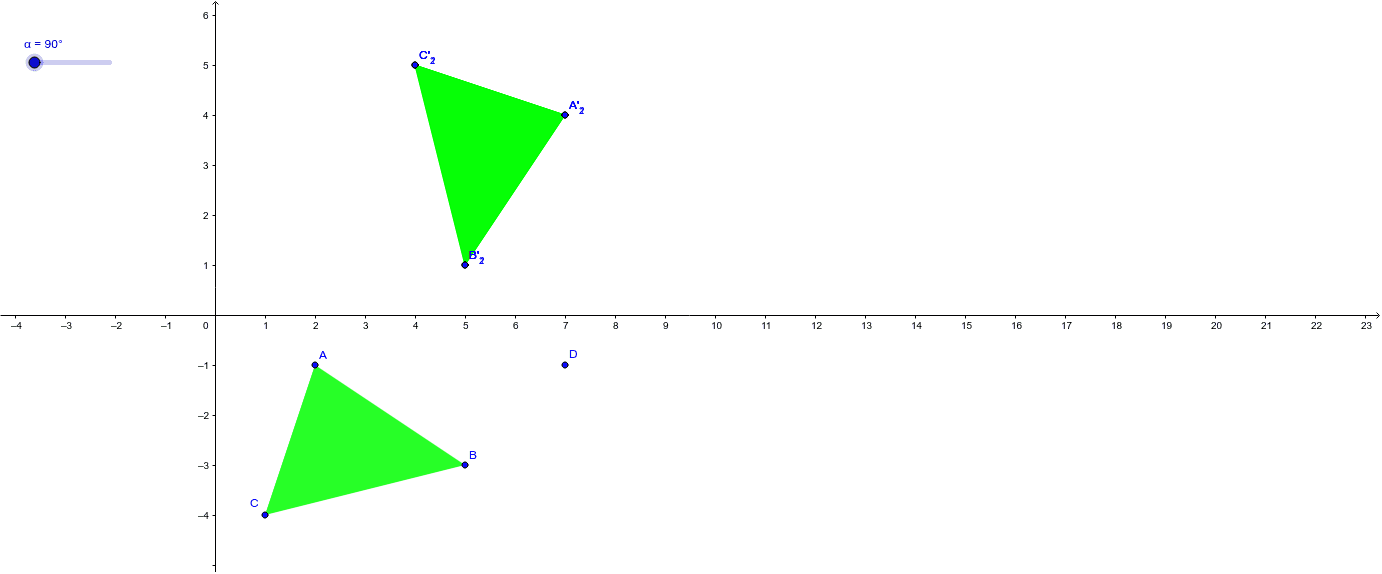
This example demonstrates the clockwise rotation of an object from 0 to 360 degrees in increments of 90. It involves core mathematical concepts such as geometric transformations, rotational symmetry, and angle measurement. The construction uses GeoGebra commands like Polygon and Rotate, along with objects A, B, C, D, poly1, b, a, c, A', C', B', α, A'_1, C'_1, B'_1, poly1'_1, b'_1, a'_1, c'_1, A'_2, C'_2, B'_2, poly1'_2, b'_2, a'_2, c'_2. It is suitable for high school students learning geometric transformations to visualize rotation effects and symmetry.
GeoGebra Commands & Parameters
Polygon(A, C, B) → poly1, b, a, cRotate(A, -90*°, D) → A'Rotate(C, -90*°, D) → C'Rotate(B, -90*°, D) → B'Rotate(A, -90*°, D) → A'_1Rotate(C, -90*°, D) → C'_1Rotate(B, -90*°, D) → B'_1Polygon(A'_1, C'_1, B'_1) → poly1'_1, b'_1, a'_1, c'_1Rotate(A, (-α), D) → A'_2Rotate(C, (-α), D) → C'_2Rotate(B, (-α), D) → B'_2Polygon(A'_2, C'_2, B'_2) → poly1', b'_2, a'_2, c'_2
AI Drawing Prompt Reference
Draw a polygon and then rotate it clockwise by 90 degrees around a point, creating new polygons at each step to show the rotation effect and symmetry, completing the full 360-degree rotation process.
The prompt above was compiled from the original drawing commands and is for reference only.