
Trammel Triangle Ellipse Construction
Loading the math board and drawing, please wait…
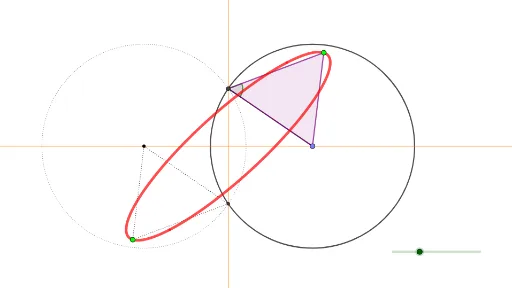
This example demonstrates how to construct an ellipse using a Trammel triangle. Key mathematical concepts include the geometric properties of ellipses and geometric construction. Using GeoGebra commands such as Point, Circle, Intersect, Rotate, etc., the dynamic generation process of the ellipse is showcased. Suitable for high school mathematics education and students learning ellipse geometry.
GeoGebra Commands & Parameters
Point(xAxis) → ACircle(A, 5) → cIntersect(c, yAxis, 2) → BRotate(A, β, B) → A'Segment(B, A) → fAngle(A, B, A') → αPolygon(A, B, A') → t1, a', a, bLocus(A', A) → loc1Intersect(xAxis, yAxis) → CMirror(A', C) → A''Locus(A'', A) → loc2Mirror(A, C) → A'_1Mirror(B, C) → B'Mirror(A', C) → A''_1Polygon(A'_1, B', A''_1) → t1', a''_1, a'_1, b'Circle(A'_1, a''_1) → dPoint(xAxis) → DPoint(xAxis) → ELine(D, E) → gPoint(yAxis) → FPoint(yAxis) → GLine(F, G) → h
AI Drawing Prompt Reference
Draw an ellipse using a triangle tracing method. Start with a horizontal and vertical line intersecting at the origin. Mark a point on the horizontal line and draw a circle with radius 5, intersecting the vertical line. Connect this point to the origin and rotate the line segment to form a triangle. Trace the path of the rotating point to create the ellipse. Use reflections and rotations to demonstrate the symmetry and geometric properties of the ellipse.
The prompt above was compiled from the original drawing commands and is for reference only.