
Topic 3: Integrated Demo of Confidence Interval, Integral, and Orthocenter
Loading the math board and drawing, please wait…
In collections
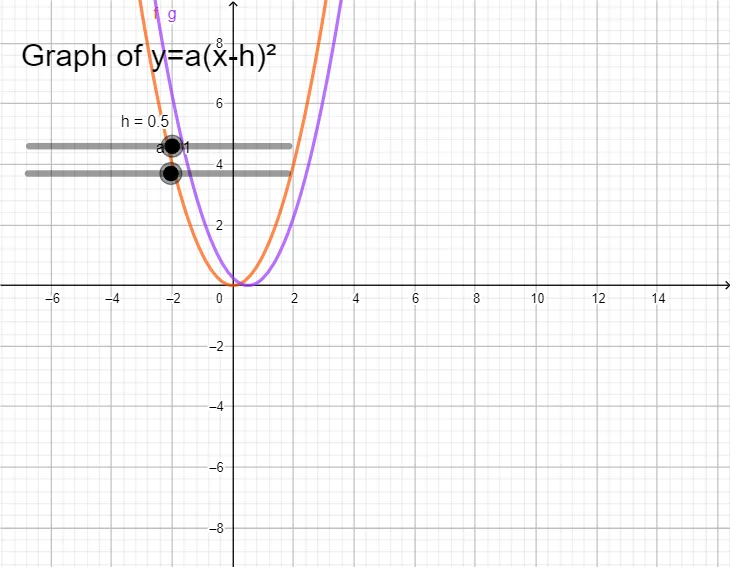
Graph of Quadratic Equation
①This example is a comprehensive mathematical demonstration that integrates the confidence interval from probability/statistics, integral calculus, and the orthocenter of a triangle within a single dynamic GeoGebra environment, showing connections between different branches of mathematics. ②Core concepts include: confidence interval for estimating parameter ranges, integral for computing areas or cumulative quantities, and orthocenter as the intersection of triangle altitudes, along with probability distributions and geometric construction. ③Construction: Based on the summary, objects f (likely a function or distribution curve), a (possibly integration limits or parameters), h (altitude or orthocenter), g (auxiliary graph or function), and text1 (text label) are used, with GeoGebra commands enabling dynamic parameter adjustment and real-time updates. ④Suitable for high school to university-level mathematics teaching, useful for cross-chapter review, helping students grasp the interplay between probability, calculus, and geometry, and serving as a template for teachers creating integrated examples.
GeoGebra Commands & Parameters
f(x) = x^(2)Numeric a(1)Numeric h(0.5)g(x) = (a * (x - h)^(2))
AI Drawing Prompt Reference
Create a comprehensive mathematical illustration: start with an upward-opening parabola as the base curve, then add an adjustable numeric parameter that controls a second similar parabola whose vertex is shifted horizontally, showing both curves on the same coordinate system for comparison. Include a triangle with its three altitudes drawn, intersecting at a single point (the orthocenter), which should be prominently marked. Along the horizontal axis, indicate a confidence interval range, and shade the area under the curve within that interval to represent an integral. Add a text label briefly explaining the connections between these concepts. Arrange all elements clearly for educational demonstration.
The prompt above was compiled from the original drawing commands and is for reference only.