
Tokolo Ring: A Rotational and Integral Geometry Construction Inspired by Olympic
Loading the math board and drawing, please wait…
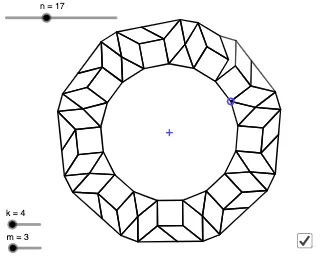
This example demonstrates a geometric figure called the 'Tokolo Ring', derived from an Olympic-themed design by Japanese designer Asao Tokolo. It showcases a ring-like composite structure generated through rotations, polygons, and integral operations. Core mathematical concepts include rotation, definite integrals, ellipses, prisms, squares, and percentages, highlighting the fusion of geometric transformations and calculus in artistic design. In terms of construction, the summary reveals the use of GeoGebra commands such as Sequence, Flatten, Element, Append, RemoveUndefined, Polygon, Rotate, Vertex, and Segment, involving objects like k, A, B, n, l1, m, l2, l3, l4, l5, l7, l8, C, D, l5', l6, a, Pl5', Pl7, l9, l10, poly1, Pl10, l11, l12, t1, t2, E, F, f, and b. The process generates point sequences, rotates polygons, and constructs segments and faces to form the ring pattern. This is suitable for high school to university-level mathematics education, useful for teaching geometric transformations, calculus applications, and interdisciplinary studies between mathematics and art, as well as a reference for mathematical modeling or creative coding.
GeoGebra Commands & Parameters
Sequence(Rotate[B, (i * (360°) / n), A], i, 1, n, 2) → l1Sequence(Rotate[B, (i * (360°) / n), A], i, 2, n, 2) → l2Sequence(Polygon[Rotate[Element[l1, i], (360°) / n, A], Element[l1, i], k], i, 1, Length[l1]) → l3Sequence(Polygon[Rotate[Element[l2, i], (360°) / n, A], Element[l2, i], m], i, 1, Length[l1]) → l4Flatten(Sequence[{Vertex[Element[l3, i], 3], Vertex[Element[l4, i], 3]}, i, 1, Length[l1]]) → l5Flatten(Sequence[{Vertex[Element[l3, i], 4], Vertex[Element[l4, i], 3]}, i, 1, Length[l1]]) → l7Sequence(pgrm[Element[l7, i], Element[l7, i - 1], Rotate[B, (i * (360°) / n), A]], i, 2, Length[l7], 2) → l8Element(l5, 1) → CElement(l5, n) → DAppend(l5, C) → l5'Sequence(pgrm[Element[l5', i], Element[l5', i + 1], Rotate[B, ((i + 1) * (360°) / n), A]], i, 2, Length[l5'] - 1, 2) → l6Element(l5', a) → Pl5'Element(l7, a) → Pl7RemoveUndefined(Sequence[pgrm[Vertex[Element[l8, i], 4], Vertex[Element[l3, i], 3], Vertex[Element[l3, i], 4]], i, 1, Length[l8]]) → l9RemoveUndefined(Flatten[Sequence[{Vertex[Element[l9, i], 4], Vertex[Element[l9, i], 1], Vertex[Element[l6, i], 4]}, i, 1, Length[l6]]]) → l10Polygon(l10) → poly1Element(l10, a) → Pl10RemoveUndefined(Sequence[Polygon[Element[l10, (3 * i)], Element[l10, (3 * i) + 1], Element[l5', (2 * i) + 1]], i, 1, Length[l5']]) → l11RemoveUndefined(Sequence[Polygon[Element[l10, (3 * i) - 1], Element[l10, (3 * i)], Element[l5', (2 * i)]], i, 1, Length[l5']]) → l12Rotate(Element[l11, Length[l11]], (720°) / n, A) → t1Rotate(Element[l9, Length[l9]], (720°) / n, A) → t2Vertex(t2, 1) → EVertex(Element[l9, 1], 4) → FSegment(E, F) → f
AI Drawing Prompt Reference
Create a ring-like composite structure inspired by an Olympic-themed design, demonstrating rotational and integral geometry. The figure is generated through rotations, polygons, and integral operations, incorporating concepts like rotation, definite integrals, ellipses, prisms, and squares. Start by creating sequences of rotated points, then build polygons from these points. Rotate and connect the polygons to form a ring pattern, finally combining all parts into a complete ring to showcase the fusion of geometric transformations and calculus in artistic design.
The prompt above was compiled from the original drawing commands and is for reference only.