
Element B: Composite Geometric Construction with Rotation and Isosceles Triangle
Loading the math board and drawing, please wait…
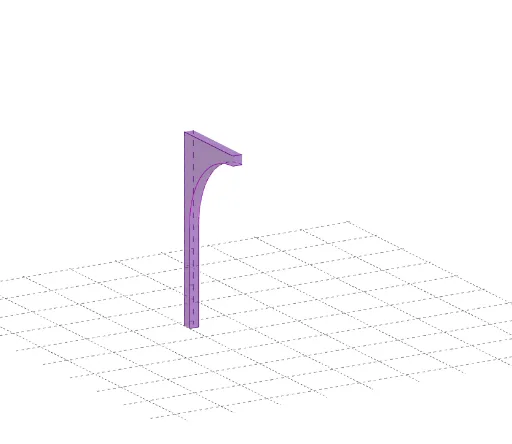
① This example demonstrates a composite geometric figure involving rotation, isosceles triangles, logarithms, congruence, and integral concepts, dynamically shown in GeoGebra. ② Core mathematical concepts include rotation, isosceles triangles, logarithms, congruence, and integral calculus, integrating geometry and algebra. ③ Construction highlights: Based on the construction summary, commands such as Polygon, Segment, Line, CircleArc, Point, and Intersect are used to create multiple quadrilaterals (vierhoek1, vierhoek2, vierhoek3) and numerous auxiliary points (A, B, C, D, E, F, etc.) and segments (a, b, c, d, e, f, etc.), building a complex figure through rotation and congruence relations. ④ Suitable for high school or early college students to explore geometric transformations, congruence properties, logarithmic graphs, and integral area problems, also useful as a dynamic geometry teaching example.
GeoGebra Commands & Parameters
Polygon(A, C, D, B) → vierhoek1, a, c, d, bPolygon(E, P, Q, F) → vierhoek2, e, p, q, fPolygon(P, N, O, Q) → vierhoek3, p_1, n, o, q_1Segment(E, A) → gSegment(G, C) → hSegment(H, D) → iLine(L, M) → jCircleArc(L, N, G) → kCircleArc(M, O, H) → rSegment(G, H) → lPoint(k) → RPoint(k) → SPoint(k) → TPoint(k) → UPoint(k) → G_1Point(k) → H_1Point(k) → I_1Point(k) → J_1Line(R, l) → mLine(S, l) → sLine(T, j) → tLine(U, j) → f_1Line(J_1, j) → g_1Line(I_1, j) → h_1Line(H_1, j) → i_1Line(G_1, j) → j_1Intersect(j_1, r) → V,Intersect(i_1, r) → W,Intersect(h_1, r) → Z,Intersect(g_1, r) → A_1,Intersect(f_1, r) → B_1,Intersect(t, r) → C_1,Intersect(s, r) → D_1,Intersect(m, r) → E_1,Polygon(G, H, E_1, R) → vierhoek4, g_2, h_2, e_1, r_1Polygon(S, R, E_1, D_1) → vierhoek5, s_1, r_2, k_1, d_1Polygon(T, S, D_1, C_1) → vierhoek6, t_1, s_2, l_1, c_1Polygon(U, T, C_1, B_1) → vierhoek7, u, t_2, m_1, b_1Polygon(J_1, U, B_1, A_1) → vierhoek8, n_1, u_1, a_1, f_2Polygon(I_1, J_1, A_1, Z) → vierhoek9, i_2, j_2, k_2, z_1Polygon(H_1, I_1, Z, W) → vierhoek10, l_2, m_2, z_2, wPolygon(G_1, H_1, W, V) → vierhoek11, n_2, p_2, w_1, vPolygon(N, G_1, V, O) → vierhoek12, n_3, q_2, v_1, o_1Line(N, e) → a_2Line(G_1, e) → b_2Line(H_1, e) → c_2Line(I_1, e) → d_2Line(J_1, e) → e_2Line(U, e) → f_3Line(T, e) → g_3Line(S, e) → h_3Line(R, e) → i_3Line(G, e) → j_3Intersect(a_2, g) → F_1Intersect(g, c_2) → L_1Intersect(d_2, g) → M_1Intersect(g, e_2) → N_1Intersect(g, f_3) → O_1Intersect(g, g_3) → P_1Intersect(g, h_3) → Q_1Intersect(g, i_3) → R_1Intersect(g, j_3) → S_1Polygon(E, F_1, N, P) → vierhoek13, e_3, k_3, n_4, p_3Line(G_1, p_3) → l_3Intersect(l_3, g) → K_1Polygon(F_1, K_1, G_1, N) → vierhoek14, m_3, q_3, r_3, n_5Polygon(K_1, L_1, H_1, G_1) → vierhoek15, s_3, t_3, a_3, b_3Polygon(L_1, M_1, I_1, H_1) → vierhoek16, c_3, d_3, f_4, g_4Polygon(M_1, N_1, J_1, I_1) → vierhoek17, h_4, i_4, j_4, k_4Polygon(N_1, O_1, U, J_1) → vierhoek18, l_4, m_4, u_2, p_4Polygon(O_1, P_1, T, U) → vierhoek19, q_4, r_4, t_4, u_3Polygon(P_1, Q_1, S, T) → vierhoek20, s_4, a_4, s_5, t_5Polygon(Q_1, R_1, R, S) → vierhoek21, b_4, c_4, r_5, s_6Polygon(R_1, S_1, G, R) → vierhoek22, d_4, e_4, g_5, r_6Polygon(S_1, A, C, G) → vierhoek23, f_5, a_5, c_5, g_6Segment(F, B) → h_5Line(O, q) → i_5Line(V, q) → j_5Line(W, q) → k_5Line(Z, q) → l_5Line(A_1, q) → m_5Line(B_1, q) → p_5Line(C_1, q) → q_5Line(D_1, q) → b_5Line(E_1, q) → d_5Line(H, q) → e_5Intersect(h_5, i_5) → T_1Intersect(j_5, h_5) → U_1Intersect(k_5, h_5) → V_1Intersect(l_5, h_5) → W_1Intersect(m_5, h_5) → Z_1Intersect(h_5, p_5) → A_2Intersect(h_5, q_5) → B_2Intersect(h_5, b_5) → C_2Intersect(d_5, h_5) → D_2Intersect(h_5, e_5) → E_2Polygon(Q, O, T_1, F) → vierhoek24, q_6, o_2, f_6, f_7Polygon(O, V) → veelhoek1, o_3, v_2Polygon(O, V, U_1, T_1) → vierhoek25, o_4, v_3, h_6, i_6Polygon(V, W, V_1, U_1) → vierhoek26, v_4, w_2, j_6, k_6Polygon(W, Z, W_1, V_1) → vierhoek27, w_3, z_3, l_6, m_6Polygon(Z, A_1, Z_1, W_1) → vierhoek28, z_4, n_6, p_6, t_6Polygon(A_1, B_1, A_2, Z_1) → vierhoek29, a_6, b_6, c_6, d_6Polygon(B_1, C_1, B_2, A_2) → vierhoek30, e_6, g_7, h_7, i_7Polygon(C_1, D_1, C_2, B_2) → vierhoek31, j_7, k_7, l_7, m_7Polygon(D_1, E_1, D_2, C_2) → vierhoek32, n_7, p_7, q_7, r_7Polygon(E_1, H, E_2, D_2) → vierhoek33, s_7, h_8, t_7, a_7Polygon(G, C, D, H) → vierhoek34, g_8, c_7, d_7, h_9Polygon(D, B, E_2, H) → vierhoek35, d_8, b_7, e_7, h_{10}Polygon(B, A, E, F) → vierhoek36, b_8, a_8, e_8, f_8Segment(P, Q) → i_8Segment(P, E) → j_8Segment(N, O) → k_8Segment(C, D) → l_8
AI Drawing Prompt Reference
Draw a complex geometric figure involving multiple quadrilaterals and triangles, constructed through rotation and congruence. The figure should include isosceles triangles, logarithmic graphs, and integral areas, showcasing the integration of geometry and algebra. Start by creating a basic framework of quadrilaterals, then generate auxiliary shapes using rotations and intersection points, ultimately forming a complex structure with interconnected quadrilaterals and triangles.
The prompt above was compiled from the original drawing commands and is for reference only.