
Tiling the Plane – Activities 1 & 2
Loading the math board and drawing, please wait…
In collections
Grade 6 Unit 1: Area and Surface Area
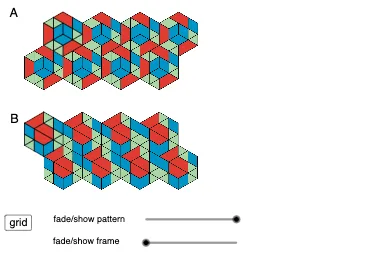
This GeoGebra example demonstrates the dynamic construction of plane tiling patterns, focusing on Activities 1 and 2, where parallelogram and polygon arrangements are explored. Core mathematical concepts include polygon properties, parallel line relationships, symmetry transformations, and the application of these ideas to create periodic tilings. The construction uses drawing tools Tool1, Tool2, Tool3 to generate polygon objects such as poly1, poly2, poly3, and employs sliders and loci to implement translations and rotations, resulting in a complete tiling structure. It is designed for high‑school geometry classes, mathematical modeling courses, and as a visual aid for teaching plane symmetry and periodic patterns, supporting classroom demonstrations, problem solving, and student inquiry.
GeoGebra Commands & Parameters
Tool3(A_7) → B_4, poly1, f, g, h, iTool3(C_7) → D_4, poly2, j, k, l, mTool3(E) → F, poly3, n, p, q, rTool2(K_3) → poly6, L_3, g_1, h_1, i_1, j_1Tool2(M) → poly7, N, k_1, l_1, m_1, n_1Tool1(O) → P, p_1, q_1, r_1, poly8Tool1(Q) → R, s_1, t_1, a_1, poly9Tool1(S) → T, b_1, c_1, d_1, poly10Tool1(U) → V, e_1, f_2, g_2, poly11Tool1(W) → Z, h_2, i_2, j_2, poly12Tool1(A_1) → B_1, k_2, l_2, m_2, poly13Tool1(C_1) → D_1, n_2, p_2, q_2, poly14Tool3(A_2) → B_2, poly1_1, f_3, g_3, h_3, i_3Tool3(C_2) → D_2, poly2_1, j_3, k_3, l_3, m_3Tool3(E_1) → F_1, poly3_1, n_3, p_3, q_3, r_2Tool2(G_1) → poly4_1, H_1, s_2, t_2, a_2, b_2Tool2(K_1) → poly6_1, L_1, g_4, h_4, i_4, j_4Tool2(M_1) → poly7_1, N_1, k_4, l_4, m_4, n_4Tool1(O_1) → P_1, p_4, q_4, r_3, poly8_1Tool1(Q_1) → R_1, s_3, t_3, a_3, poly9_1Tool1(S_1) → T_1, b_3, c_3, d_3, poly10_1Tool1(U_1) → V_1, e_3, f_5, g_5, poly11_1Tool1(W_1) → Z_1, h_5, i_5, j_5, poly12_1Tool1(A_3) → B_3, k_5, l_5, m_5, poly13_1Tool1(C_3) → D_3, n_5, p_5, q_5, poly14_1Tool2(G_2) → poly4_2, H_2, s_4, t_4, a_5, b_5Tool2(I_2) → poly5_2, J_2, c_4, d_4, e_4, f_6Tool2(K_2) → poly6_2, L_2, g_6, h_6, i_6, j_6
AI Drawing Prompt Reference
Draw a periodic plane tiling by first creating a parallelogram and two polygons as fundamental tiles, then applying translations and rotations controlled by sliders to replicate the tiles along two independent directions, producing a full lattice; the figure shows several families of parallel lines, symmetry axes, and many transformed copies of the polygons, illustrating polygon properties, parallelism, and symmetry transformations in tiling.
The prompt above was compiled from the original drawing commands and is for reference only.