
The Unit Circle: Interactive Trigonometric and Geometric Construction
Loading the math board and drawing, please wait…
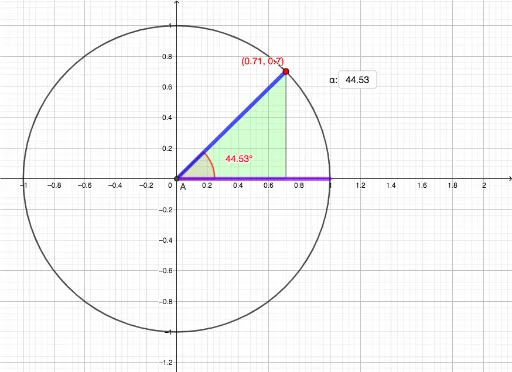
This GeoGebra example dynamically illustrates the fundamental properties of the unit circle, showing how coordinates of points on the circle correspond to angles and trigonometric values. Core mathematical concepts include the unit circle definition, angle rotation, geometric meaning of sine and cosine, and connections with polygons, segments, and other basic geometric elements. Construction highlights: the Circle command creates the unit circle, Intersect finds key points, Rotate and Angle build rotation angles, OrthogonalLine constructs perpendiculars, Polygon forms related triangles, and Textfield/InputBox allow parameter input and dynamic adjustment. Suitable for high school and early college students to grasp the relationship between trigonometry, radian measure, and the unit circle, and also serves as an interactive tool for classroom demonstrations or self-directed exploration.
GeoGebra Commands & Parameters
Intersect(xAxis, yAxis) → ACircle(A, 1) → cIntersect(c, xAxis, 1) → CIntersect(c, xAxis, 2) → DSegment(C, D) → fTextfield(α) → InputBox1Rotate(D, α°, A) → D'Angle(D, A, D') → βSegment(D', A) → gOrthogonalLine(D', f) → hIntersect(h, f) → BSegment(D', B) → iSegment(B, A) → jSegment(A, D) → kPolygon(A, B, D') → t1, d', a_1, b_1
AI Drawing Prompt Reference
Draw a unit circle and mark point D with angle α, rotate D to form D', calculate angle β, construct perpendicular line h, find intersection B, and connect relevant points to form triangle t1.
The prompt above was compiled from the original drawing commands and is for reference only.