
The Golden Rectangle
Loading the math board and drawing, please wait…
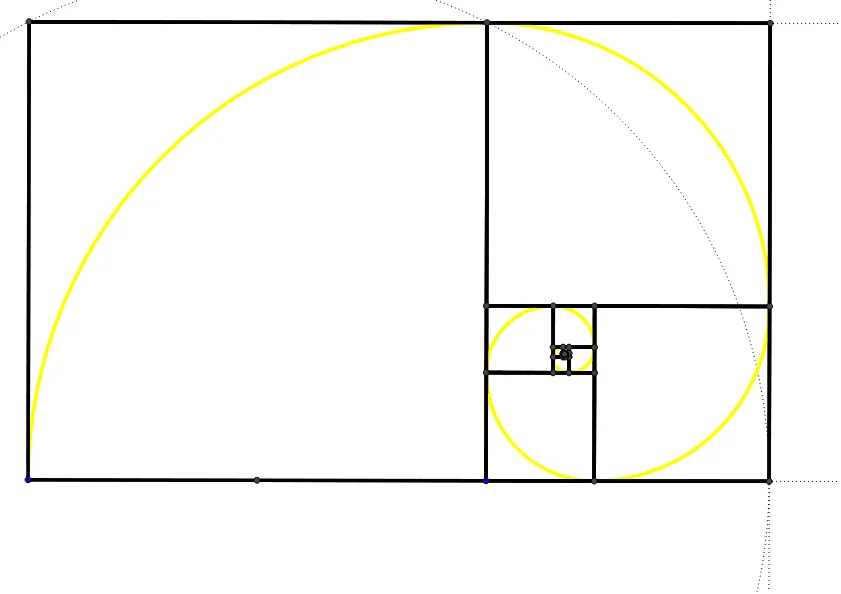
This example demonstrates the construction of a golden rectangle, a special type of rectangle with a length-to-width ratio of the golden ratio. Key mathematical concepts include proportion and similarity. Using GeoGebra commands such as Polygon, Midpoint, Circle, etc., a dynamic construction of the golden rectangle is achieved. Suitable for middle school and above students to learn about the concept of proportion and the golden section.
GeoGebra Commands & Parameters
Polygon(A, B, 4) → poly1, a, b, c, d, C, DMidpoint(A, B) → ECircle(E, C) → eRay(A, B) → fIntersect(e, f, 1) → FRay(D, C) → gOrthogonalLine(F, f) → hIntersect(h, g) → GSegment(C, G) → iSegment(G, F) → jSegment(F, B) → kPolygon(G, C, 4) → poly2, l, m, n, p, H, IPolygon(F, I, 4) → poly3, q, r, s, t, J, KPolygon(B, K, 4) → poly4, a_1, b_1, c_1, d_1, L, MPolygon(H, M, 4) → poly5, e_1, f_1, g_1, h_1, N, OPolygon(J, O, 4) → poly6, i_1, j_1, k_1, l_1, P, QPolygon(L, Q, 4) → poly7, m_1, n_1, p_1, q_1, R, SPolygon(N, S, 4) → poly8, r_1, s_1, t_1, a_2, T, UPolygon(P, U, 4) → poly9, b_2, c_2, d_2, e_2, V, WPolygon(R, W, 4) → poly10, f_2, g_2, h_2, i_2, Z, A_1Polygon(T, A_1, 4) → poly11, j_2, k_2, l_2, m_2, B_1, C_1Polygon(V, C_1, 4) → poly12, n_2, p_2, q_2, r_2, D_1, E_1Polygon(Z, E_1, 4) → poly13, s_2, t_2, a_3, b_3, F_1, G_1Polygon(B_1, G_1, 4) → poly14, c_3, d_3, e_3, f_3, H_1, I_1Polygon(D_1, I_1, 4) → poly15, g_3, h_3, i_3, j_3, J_1, K_1Polygon(F_1, K_1, 4) → poly16, k_3, l_3, m_3, n_3, L_1, M_1Polygon(H_1, M_1, 4) → poly17, p_3, q_3, r_3, s_3, N_1, O_1CircleArc(N_1, O_1, M_1) → t_3CircleArc(L_1, M_1, K_1) → c_4CircleArc(J_1, K_1, I_1) → d_4CircleArc(H_1, I_1, G_1) → e_4CircleArc(F_1, G_1, E_1) → f_4CircleArc(D_1, E_1, C_1) → g_4CircleArc(B_1, C_1, A_1) → h_4CircleArc(Z, A_1, W) → k_4CircleArc(V, W, U) → p_4CircleArc(T, U, S) → q_4CircleArc(R, S, Q) → r_4CircleArc(P, Q, O) → s_4CircleArc(N, O, M) → t_4CircleArc(L, M, K) → c_5CircleArc(J, K, I) → d_5CircleArc(H, I, C) → e_5CircleArc(B, C, A) → f_5
AI Drawing Prompt Reference
Draw a golden rectangle by first creating a rectangle ABCD, then finding the midpoint E of AB, drawing a circle with E as the center and C as the radius, intersecting the extension of AB at F, then drawing a perpendicular line to FC intersecting the extension of DC at G, connecting CG, GF, and FB to form a new rectangle CGFB. Repeat this process, each time drawing a circle with the diagonal of the new rectangle as the diameter, intersecting the extensions of adjacent sides at new points, and connecting these points to form new rectangles until the shapes become sufficiently small.
The prompt above was compiled from the original drawing commands and is for reference only.