
The Fourth Intersection Point of the Circumconic
Loading the math board and drawing, please wait…
In collections
A Tour of Triangle Geometry
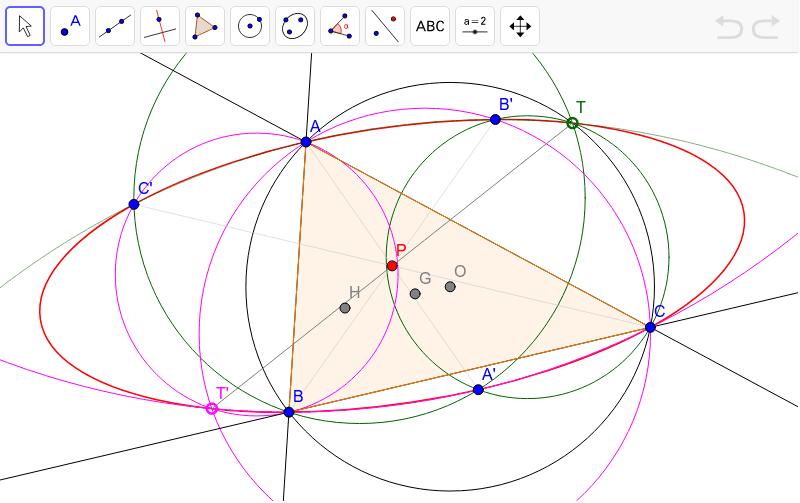
This example demonstrates how to construct a circumconic with center P. By constructing the antipodal points A', B', and C' of A, B, and C, and using circles AB'C', BA'C', and CA'B', the intersection points are found to form the circumconic. GeoGebra commands used include Line, Circle, Centroid, OrthogonalLine, Intersect, Center, Polygon, Mirror, LineBisector, and Conic. Suitable for high school geometry learners and math enthusiasts.
GeoGebra Commands & Parameters
Line(A, B) → aLine(B, C) → bLine(C, A) → cCircle(A, B, C) → dCentroid(Polygon[A, B, C]) → GOrthogonalLine(A, b) → eOrthogonalLine(B, c) → fIntersect(e, f) → HCenter(d) → OPolygon(A, B, C) → poly1, c_1, a_1, b_1Mirror(G, b_1) → G'Mirror(G, c_1) → G'_1Mirror(G, a_1) → G'_2LineBisector(G'_1, G') → hLineBisector(G'_2, G') → iMirror(A, P) → A'Mirror(B, P) → B'Mirror(C, P) → C'Conic(C', A, B', C, B) → gSegment(C', C) → jSegment(B', B) → kSegment(A, A') → lCircle(A, C', B') → pCircle(B, C', A') → qCircle(C, A', B') → rIntersect(d, q, 2) → TCircle(A, C, B') → sCircle(A, B, C') → tCircle(B, A', C) → d_1Intersect(s, t, 2) → T'Segment(T', T) → mPolygon(A, B, C) → poly2, c_2, a_2, b_2
AI Drawing Prompt Reference
Draw a triangle and find its circumcircle and centroid. Locate three points on the circumcircle, connect them to the triangle's vertices, and draw perpendicular lines. The intersection points form a new triangle. Reflect the vertices of this new triangle over the sides of the original triangle to get three new points. Connect these points and draw three circles. The intersections of these circles form a special conic section. Finally, connect these intersection points to the original triangle's vertices to complete the drawing.
The prompt above was compiled from the original drawing commands and is for reference only.