
The Birth of an Ellipse: From Basic Geometry to the Curve
Loading the math board and drawing, please wait…
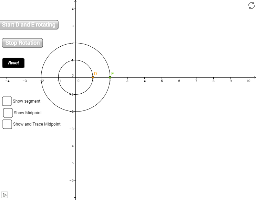
This example demonstrates how a single ellipse emerges from a sequence of fundamental geometric constructions, such as circle intersections, rotations, and segment midpoints. It visually shows that an ellipse is not merely defined by a standard equation but can arise naturally from pure geometric relationships. Core mathematical concepts include the ellipse as the locus of points with a constant sum of distances to two foci, properties of circle intersection and rotation, midpoint of a segment, and the dependency among geometric objects. Construction highlights: using GeoGebra commands Intersect, Circle, Rotate, Segment, and Midpoint, with interactive buttons (button1-3) and text labels (text1-3) to control the dynamic process. Objects include points A, B, C, D, E, F, G, circles c and d, segments a and b, and auxiliary elements e, f, g, h, i, j. Suitable for high school or early college students to understand the definition and geometric construction of an ellipse, and for teachers to demonstrate the dynamic generation process in class, bridging intuitive manipulation and analytic geometry.
GeoGebra Commands & Parameters
Intersect(xAxis, yAxis) → ACircle(A, B) → cCircle(A, C) → dRotate(B, a, A) → DRotate(C, (-a), A) → ESegment(D, E) → bMidpoint(b) → F
AI Drawing Prompt Reference
Draw an ellipse starting with the intersection of two circles. First, create point A at the intersection of the x-axis and y-axis. Then, draw two circles c and d with centers at A and points B and C respectively. Next, rotate point B around A by angle a to get point D, and rotate point C around A by -a to get point E. Connect D and E to form line segment b. Finally, find the midpoint F of line segment b to get a key point of the ellipse.
The prompt above was compiled from the original drawing commands and is for reference only.