
Textbook Pg. 57, #11, part (a): Circle and Polygon Construction
Loading the math board and drawing, please wait…
In collections
Invariant Ratios
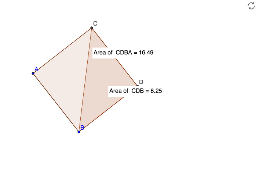
This example demonstrates a geometric construction based on a textbook exercise, focusing on the relationships among circles, line segments, polygons, and perpendicular lines. The core mathematical concepts include circle properties, segment and polygon formation, perpendicularity, and intersection points. The construction uses GeoGebra commands such as Circle, Segment, OrthogonalLine, Intersect, Line, Polygon, and PointIn, involving objects like points A, B, C, D, circle c, segments a and b, polygons poly1 and poly2, along with associated text labels. It is suitable for middle or high school geometry classes to explore step-by-step construction techniques and geometric properties when combining circles with polygons, and can serve as a teacher demonstration or student inquiry activity.
GeoGebra Commands & Parameters
Circle(A, B) → cSegment(B, A) → aOrthogonalLine(A, a) → bIntersect(c, b, 1) → CLine(B, b) → dLine(C, a) → eSegment(A, C) → fSegment(B, A) → gIntersect(d, e) → DSegment(B, D) → hSegment(D, C) → iPolygon(C, D, B) → poly1, b_1, c_1, d_1PointIn(poly1) → Pointpoly1Polygon(C, D, B, A) → poly2, c_2, d_2, b_2, a_1PointIn(poly2) → Pointpoly2
AI Drawing Prompt Reference
Draw a circle with center A passing through point B. Draw segment AB. Construct a line through A perpendicular to AB. Mark the intersection of this perpendicular line with the circle as point C. Through B draw a line parallel to the perpendicular line. Through C draw a line parallel to AB. The intersection of these two lines is point D. Connect B to D and D to C. Form triangle C‑D‑B and place a point inside it. Then create quadrilateral C‑D‑B‑A and add a point inside this shape.
The prompt above was compiled from the original drawing commands and is for reference only.